A `ReportPrintTask` represents a single print job — a PDF queued for delivery to a physical printer. VeloxFactory does not communicate with printers directly. Instead, it creates the task record, optionally notifies a separate print service via WebSocket, and waits for the service to report back. This page covers how tasks are created, how the status lifecycle works, and how to handle retries.
[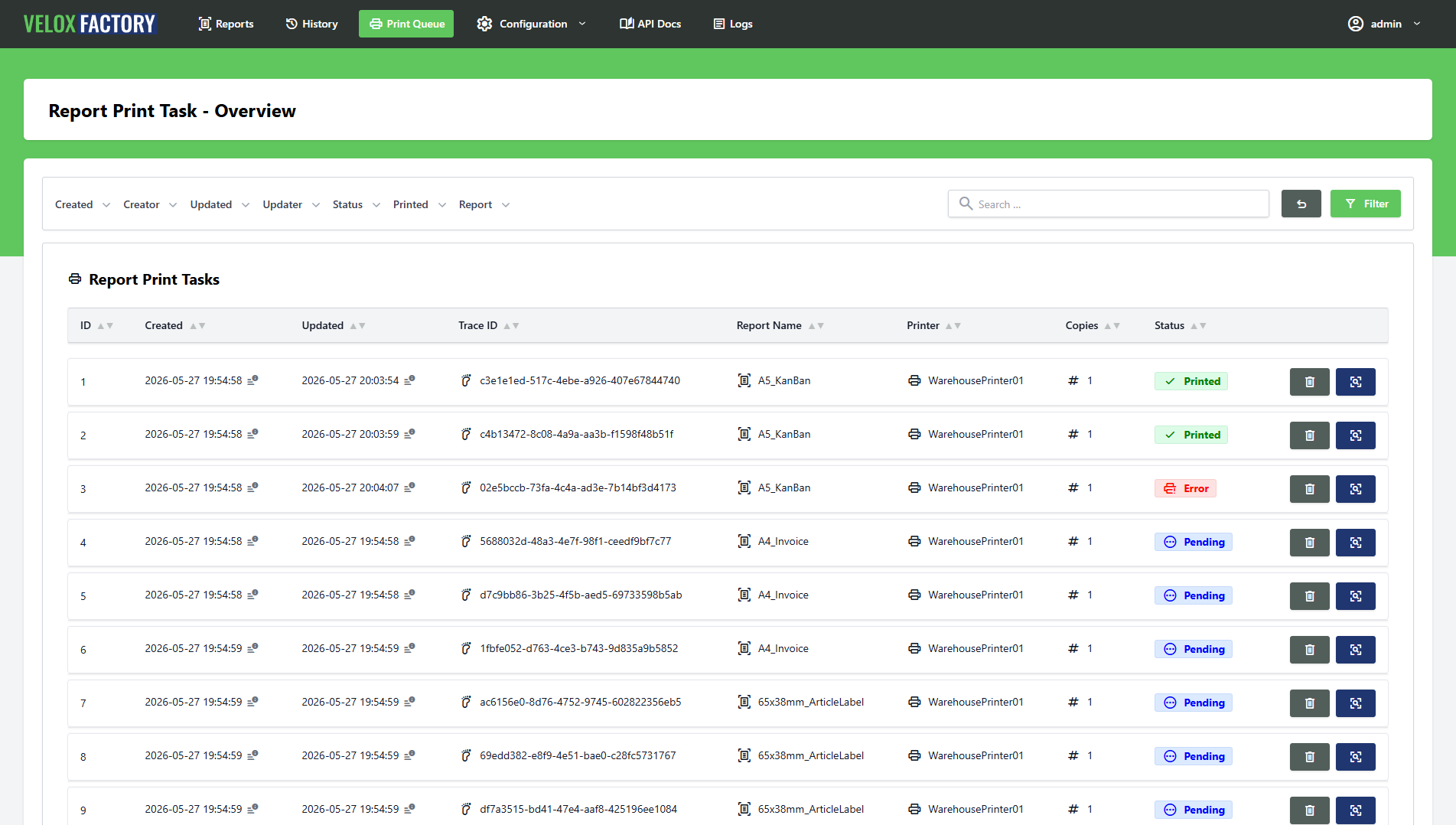](https://docs.veloxfactory.kiwi-software.dev/uploads/images/gallery/2026-05/report-print-task-index.png)
---
Three Ways to Create a Print Task
1. As Part of a Render Request
The most common path: set `createPrintTask: true` in the render request body, provide a `printerName`, and VeloxFactory renders the report and dispatches it to the printer in a single call. No second request needed.
```json
POST /api/v1/report-config/A5_KanBan/render
{
"outputType": "base64",
"parameters": { "P_ARTICLE_NUMBER": "4561287-154" },
"data": [ { ... } ],
"createHistoryRecord": true,
"createPrintTask": true,
"printerName": "WarehousePrinter01",
"numberOfCopies": 1,
"broadcastId": "Standard"
}
```
2. From a History Record
A task can be dispatched from any existing `ReportHistoryRecord` — without re-rendering the report. VeloxFactory uses the PDF stored in the history record and creates a new print task from it:
```
POST /api/v1/report-history-record/{id}/print
```
```json
{
"printerName": "WarehousePrinter01",
"numberOfCopies": 2
}
```
This is the standard reprint path. See [The concept of Report History Records](#) for details.
3. Standalone via the Print Task API
Print tasks can also be created directly — independently of any render or history record. The `POST /api/v1/report-print-task` endpoint accepts any PDF as a Base64 string, making it possible to use the VeloxFactory print infrastructure for documents that were not produced by VeloxFactory at all.
```json
POST /api/v1/report-print-task
{
"fileName": "delivery_note_5521.pdf",
"fileBase64": "JVBERi0xLjQ...",
"printerName": "WarehousePrinter01",
"numberOfCopies": 1,
"broadcastId": "Standard"
}
```
`reportConfig` and `reportHistoryRecord` are both optional on this endpoint — the task is created without either relation if they are not provided.
---
The Data Model
| Field |
Description |
traceId |
Unique identifier. Shared with the linked history record when the task was created via a render request. For reprints, a derived trace ID is generated (original + short random suffix). |
reportConfig |
The ReportConfig the printed PDF was generated from. Optional — not present for standalone tasks. |
reportHistoryRecord |
The linked ReportHistoryRecord. Optional — not present for standalone tasks. |
printerName |
The name of the target printer, as the print service expects it. |
numberOfCopies |
Number of copies passed to the print service. VeloxFactory always renders once — the print service is responsible for duplication. Defaults to 1. |
broadcastId |
WebSocket channel ID. If set at creation time, VeloxFactory broadcasts a ReportPrintTaskCreated event via Laravel Reverb. Omit to use polling instead. |
outputFileName |
The filename of the PDF queued for printing. |
status |
Current state of the task. See below. |
errorMessage |
Failure detail reported by the print service. null unless status is error. |
---
Status Lifecycle
Every print task starts as `pending`. The print service picks it up, executes the job, and reports the result back to VeloxFactory via the API:
| Status |
Set by |
Meaning |
| pending |
VeloxFactory |
Task created, waiting for the print service to pick it up. |
| printed |
Print service |
Print job executed and confirmed. |
| error |
Print service |
Print job failed. errorMessage contains the failure detail. |
| unknown |
— |
Status could not be determined. |
The print service reports back using the dedicated status endpoint:
```
PATCH /api/v1/report-print-task/{id}/set-status
{
"status": "error",
"errorMessage": "Printer offline"
}
```
Resetting to Pending
A task can be reset to `pending` using the set-printed shortcut endpoint — setting the status flag to `false`:
```
PATCH /api/v1/report-print-task/{id}/set-printed/false
```
This re-queues the task. If the task has a `broadcastId`, VeloxFactory re-broadcasts the `ReportPrintTaskCreated` event immediately — notifying the print service to pick the task up again without polling. This is the standard retry mechanism for failed or stalled print jobs.
---
WebSocket vs. Polling
How the print service learns about a new task depends on whether a `broadcastId` is set.
**With `broadcastId`** — VeloxFactory broadcasts a `ReportPrintTaskCreated` event via WebSocket (Laravel Reverb) the moment the task is created. The print service subscribes to the channel identified by `broadcastId` and reacts immediately. This is the recommended mode for real-time printing — the task reaches the printer within milliseconds of the render completing.
**Without `broadcastId`** — No broadcast is sent. The print service must poll `GET /api/v1/report-print-task?status=pending` at a regular interval and process any tasks it finds. This works fine for workflows where sub-second delivery is not required.
ℹ️
WebSocket delivery requires Laravel Reverb to be running. If Reverb is down, task creation will fail with an error rather than falling back silently to polling. Use Supervisor to keep the Reverb process alive — the same Supervisor configuration that manages the Laravel queue worker should include a
php artisan reverb:start program entry. See
Installing VeloxFactory for a reference configuration.
---
Retention and Deletion
Print tasks are automatically purged after a configurable number of days, set via the `PURGE_PRINTTASKS_DAYS` environment variable (default: 30 days). Purging runs as a scheduled background job — no manual action required.
Individual tasks can also be deleted directly via the API at any time:
```
DELETE /api/v1/report-print-task/{id}
```
There are no deletion constraints on print tasks themselves — they can always be removed. However, deleting a print task is a prerequisite for deleting the linked `ReportHistoryRecord`, which in turn must be cleared before a `ReportConfig` can be deleted. Automatic purging handles this chain in the background once retention periods expire.
VeloxFactory does not talk to printers directly. Instead, a lightweight companion application — the **Background Printing Service** — runs on any Windows machine that has the target printers installed. It receives print tasks from VeloxFactory, renders the PDF to the printer, and reports the result back. The two components communicate exclusively over the VeloxFactory API and WebSocket; there is no shared database or filesystem.
---
How it works
The service starts as a regular Windows console process and works through two sequential phases.
Phase 1 — Initial pull
On startup the service immediately calls `GET /api/v1/report-print-task?status=pending` and processes all tasks it finds. It repeats this in a loop — waiting two seconds between rounds — until the queue comes back empty *and* no jobs are still running. This ensures that any tasks queued while the service was offline are handled before switching to real-time mode.
Phase 2 — WebSocket listener
Once the initial queue is drained, the service connects to VeloxFactory's WebSocket endpoint (Laravel Reverb) and subscribes to the private channel `private-report-print-tasks`. From this point on, it reacts to incoming events in real time. If the WebSocket connection drops for any reason, the service waits five seconds and reconnects automatically — no manual restart required.
ℹ️ The WebSocket uses the Pusher protocol. When a connection is established, the service authenticates with VeloxFactory via POST /api/v1/broadcasting/auth and subscribes to the private channel using the configured API token.
---
Processing a print task
Whether a task arrives via the initial pull or via a WebSocket event, the processing steps are identical:
1. **Fetch** — The service calls `GET /api/v1/report-print-task/{id}` to retrieve the full task record, including the PDF as a Base64 string.
2. **Write temp file** — The PDF is decoded and written to a temporary file in `reportPdfFileTempPath` (e.g. `C:\VeloxFactory\temp\42_delivery_note.pdf`).
3. **Print** — PdfiumViewer opens the PDF and sends it to the printer specified in `printerName`. The print is repeated `numberOfCopies` times.
4. **Report back** — On success, the service calls `PATCH /api/v1/report-print-task/{id}/set-printed`, which sets the status to `printed`. On failure, it calls `PATCH /api/v1/report-print-task/{id}/set-status` with `{"status": "error", "errorMessage": "..."}`.
5. **Cleanup** — The temporary file is deleted regardless of the outcome.
⚠️ The WebSocket event only carries the task ID and broadcastId — not the PDF. The service always fetches the full task from the API as a second step. This means the printer machine needs HTTP access to VeloxFactory, not just WebSocket access.
---
Broadcast ID filtering
`listeningBroadcastIds` is a list of broadcast channel identifiers the service will accept. Any `report-print-task.created` event whose `broadcastId` is not in this list is silently ignored.
This makes it straightforward to run multiple service instances in parallel — for example one per location or printer group — each configured to respond only to its own `broadcastId`. The initial pull is not filtered this way: it always processes all pending tasks returned by the API, regardless of `broadcastId`.
---
Configuration
All settings live in `App.config` in the `applicationSettings` section. Edit the file in a text editor and restart the service for changes to take effect.
| Setting |
Description |
Example |
apiToken |
Bearer token used for all API requests. Must belong to a user with report-print-task:read, :update, and :delete permissions. |
4|abc123... |
websocketUrl |
WebSocket endpoint of Laravel Reverb. |
ws://10.0.0.10:8080/app/veloxfactory |
websocketAuthUrl |
VeloxFactory broadcasting auth endpoint. |
http://10.0.0.10:8088/api/v1/broadcasting/auth |
reportPrintTask_index |
URL for the initial pull — must include ?status=pending. |
http://10.0.0.10:8088/api/v1/report-print-task?status=pending |
reportPrintTask_get |
URL template for fetching a single task. {0} is replaced with the task ID. |
http://10.0.0.10:8088/api/v1/report-print-task/{0} |
reportPrintTask_setPrinted |
URL template for marking a task as printed. {0} is replaced with the task ID. |
http://10.0.0.10:8088/api/v1/report-print-task/{0}/set-printed |
reportPrintTask_setError |
URL template for reporting a failed task. {0} is replaced with the task ID. |
http://10.0.0.10:8088/api/v1/report-print-task/{0}/set-status |
listeningBroadcastIds |
List of broadcast IDs this instance will accept. Add one <string> entry per ID. |
Standard, Warehouse |
maxParallelPrintJobs |
Maximum number of tasks processed concurrently. Default: 10. |
10 |
reportPdfFileTempPath |
Directory for temporary PDF files. Created automatically on startup if it does not exist. |
C:\VeloxFactory\temp |
logFile |
Path to the log file. Relative paths are resolved from the executable directory. |
.\Log.log |
laconicLogging |
If True, only errors are logged. If False, all informational messages are logged as well. |
False |
---
Concurrency
The service uses two layers of concurrency control to avoid overloading printers.
A global semaphore limits the total number of tasks being processed at the same time to `maxParallelPrintJobs`. In addition, a per-printer semaphore ensures that only one print job runs on a given printer at a time — jobs targeting different printers can execute in parallel, but two jobs targeting the same printer are always serialised. This prevents the spooler from receiving multiple jobs simultaneously from the service.
---
Logging
The service uses **Serilog** and writes to both the console and a rolling log file. Log files are capped at 100 MB each; up to 10 rotated files are retained before the oldest is deleted.
Set `laconicLogging` to `True` in `App.config` to suppress informational messages and log only errors — useful in production once the service is confirmed working.
---
Dependencies
| Package |
Purpose |
PdfiumViewer |
PDF rendering and printing. Wraps the native PDFium library (bundled via PdfiumViewer.Native.x86_64.v8-xfa) — no separate PDF reader installation required on the target machine. |
RestSharp |
HTTP client for all API calls to VeloxFactory. |
Newtonsoft.Json |
JSON serialisation and deserialisation (API responses, WebSocket messages). |
Serilog |
Structured logging to console and rolling file. |
ℹ️ The service targets .NET Framework 4.7.2 and runs on Windows only. The PDFium native binary is bundled with the build output — no additional runtime installation is needed beyond .NET Framework 4.7.2, which ships with Windows 10 and Windows Server 2016 and later.