VeloxFactory
- The Basics
- What is VeloxFactory?
- Our Vision
- Installing VeloxFactory
- Configuration and data models
- Meet the frontend
- Meet the API
- Try it out
- Open Source Attribution
- Get VeloxFactory
- Report Configurations
- Creating reports in Jaspersoft Studio
- Managing reports in VeloxFactory
- Data adapters for dyn. data control
- Rendering reports in VeloxFactory
- Print your renderings
- Case studies
- Administration
The Basics
What is VeloxFactory?
VeloxFactory is a web application that lets you manage and render JasperReports templates — via a clean frontend, a powerful REST API, or both. It turns the well-established JasperReports engine into something any application can consume with a single HTTP call.
Where VeloxFactory Fits
JasperReports is a mature, battle-tested report engine. It produces high-quality PDFs, supports complex layouts, barcodes, images, and dynamic data — and it has been doing so reliably for decades. Integrating it directly requires a JVM on your server and Java code to drive it — which is a natural fit for Java stacks, but an overhead most PHP, Python, or C# teams prefer to avoid.
VeloxFactory sits on top of the JasperReports render engine and exposes its capabilities via a clean REST API and a management frontend. The render engine runs in pure PHP — no JVM process required on your application server. You design your report templates in Jaspersoft Studio as usual, upload them once, and from that point on — rendering is just a POST request.
POST /api/v1/report-config/A5_KanBan/render
Content-Type: application/json
Authorization: Bearer <token>
{
"outputType": "base64",
"parameters": { "P_ARTICLE_NUMBER": "4561287-154" },
"data": [...],
"createHistoryRecord": true
}
That is the entire integration.
Where It Came From
VeloxFactory was built by someone with a logistics and IT background who needed a simple, reliable way to generate article labels on demand — from whatever system was running at the time, without caring about the underlying report engine. The original idea was modest: a small API wrapper around JasperReports, nothing more.
It grew. A frontend to manage templates. Connection configs for live SQL data. History records for traceability. Print task dispatching. A permission system. What started as "just get me a label PDF" is now a full suite — and the name stuck, question mark and all.
What VeloxFactory Does
At its core, VeloxFactory does four things:
Manages report templates. You upload .jrxml files, and VeloxFactory analyses them automatically — detecting parameters, data fields, and image resources. Everything is stored, versioned, and ready to render.
Connects to your data. VeloxFactory can execute SQL queries against live databases at render time. MySQL, MariaDB, PostgreSQL, and SQL Server are all supported. No live connection needed either — you can deliver data directly in the render request as a JSON array, which makes it equally useful for applications that already have the data in memory.
Renders on demand. A single API call produces a PDF. You choose the output format — Base64-encoded inline, a file URL, or silent output for print-only flows. Rendering is synchronous and fast.
Dispatches print jobs. Rendered PDFs can be forwarded directly to a print service via WebSocket, creating a traceable ReportPrintTask with status tracking. Labels off the printer, not just on the screen.
Who It Is For
VeloxFactory is for anyone who needs to generate documents — labels, reports, delivery notes, production sheets, certificates — reliably and programmatically. The typical home is in logistics, production, and warehousing, where printing article labels, kanban cards, or shipment documents is a daily operational need and downtime is not an option.
More broadly: if your application needs to produce a PDF from structured data, and you do not want to build and maintain a report engine yourself, VeloxFactory is the answer.
Deployment
VeloxFactory is a standard Laravel application. It runs wherever PHP runs — which is nearly everywhere.
| Scenario | Works? |
|---|---|
| Cloud VM or VPS | Yes |
| On-premise server | Yes |
| Docker container | Yes |
| Raspberry Pi on the shop floor | Yes |
| Jaspersoft Server | Not needed |
The setup is intentionally slim. PHP, a database for VeloxFactory itself, and the JasperPHP render engine — that is the stack. No application server, no JVM process to manage, no separate Jaspersoft infrastructure. VeloxFactory bundles everything it needs.
Login: demo@velox.factory · Password: demo
Our Vision
VeloxFactory exists because good software should not be complicated, expensive, or opaque. This page explains what we are building towards and how we think about working with the people who use it.
Simple by Design
The goal behind VeloxFactory has always been the same: take a powerful but complex technology and make it accessible to teams who just need it to work. Not teams with a dedicated Java architect. Not teams with a six-figure infrastructure budget. Teams with a problem to solve and a deadline to meet.
That philosophy shapes every decision in VeloxFactory — from the API design to the frontend workflows. Concepts should be easy to grasp. Setup should be fast. Day-to-day use should feel obvious, even for someone who has never heard of JasperReports.
Reliable and Performant
Simple does not mean limited. VeloxFactory is designed to handle real production workloads — in logistics, on the shop floor, in warehouses where a label printer needs to respond in milliseconds and cannot afford to fail during a shift.
The architecture reflects this. The stack is intentionally slim — no unnecessary layers, no bloat. Rendering is synchronous and fast. The application runs comfortably on modest hardware, including single-board computers deployed directly in production environments.
When VeloxFactory is running, it runs. That is the expectation we build to.
No Lock-In
VeloxFactory is built exclusively on open-source components. There is no proprietary cloud dependency, no mandatory subscription, no remote kill switch. You run it where you want — on your own server, in your own cloud account, on a machine on your shop floor — and it stays yours.
The report templates you design in Jaspersoft Studio are standard .jrxml files. The database you connect to is your own. The PDFs it produces belong to you. VeloxFactory is infrastructure you own and control, not a service you rent.
Grows With You
Most customers start with a single, focused use case — generating an article label, a delivery note, a production sheet. VeloxFactory handles that out of the box. But as requirements evolve, the platform grows with them.
History records for traceability. Print task dispatching via WebSocket. Multi-report management with a structured permission system. API access for any system that can make an HTTP call. None of these need to be in scope on day one — but they are all there when the time comes.
Beyond the built-in capabilities, VeloxFactory is extended on request. If a workflow requires something specific, it can be built in. Licenses include continued development and updates — the software does not freeze at the point of purchase.
A Real Partner
VeloxFactory is not sold by a faceless vendor with a tiered support portal. It is built and maintained by someone with deep hands-on experience in logistics IT, system integration, and shop floor environments — and that experience is available directly to every customer.
This means practical help where it matters: rolling out the application, connecting it to existing ERP or WMS systems, adapting report templates to operational realities, and making sure the implementation actually works in the environment it needs to run in — not just in a demo.
The goal is not a one-time sale. It is a long-term working relationship with customers who have real problems and need a partner who understands them.
The Full Picture
To put it plainly: VeloxFactory is powerful software at a reasonable price, built on open foundations, designed to be simple to operate, and backed by someone who will pick up the phone.
If that sounds like what you need — welcome.
Installing VeloxFactory
VeloxFactory is a standard Laravel application. The setup is intentionally slim — pull the repository, install dependencies, configure the environment, migrate the database. A standard installation is up and running in under 30 minutes.
What You Don't Need
Before listing what is required, it is worth being explicit about what is not:
- No Java — the render engine is pure PHP. No JVM, no Java runtime, no Java SQL drivers.
- No Node.js / npm / Vite — the frontend assets are pre-built and bundled with the repository.
- No Jaspersoft Server — VeloxFactory is entirely self-contained.
- No Docker — optional for the database only, not required for the application itself.
System Requirements
| Requirement | Notes |
|---|---|
| PHP >= 8.2 | Required extensions: ctype, curl, fileinfo, filter, hash, mbstring, openssl, pcntl, pdo, pdo_sqlite, posix, redis, session, simplexml, tokenizer. For report database connections, additionally: pdo_mysql (MySQL / MariaDB), pdo_pgsql (PostgreSQL). SQL Server is listed separately below. |
| Composer | PHP dependency manager — getcomposer.org |
| MySQL or MariaDB | VeloxFactory's own application database. A Docker container works fine if no local instance is available. |
| Redis | Required for the queue driver (Laravel Horizon). Install via apt install redis-server or run as a Docker container. The php-redis extension must also be installed: apt install php-redis. See Background Job Processing for details. |
| poppler-utils | Provides pdftoppm, used for generating report thumbnails. Install via apt install poppler-utils. |
| Supervisor | Keeps the three background processes running: Horizon (queue workers), Reverb (WebSocket server), and the Scheduler. See Background Job Processing for the full Supervisor configuration. |
| Apache2 or nginx | Optional reverse proxy. Not required for local or development setups. |
| php-sqlsrv / pdo_sqlsrv | Only required when connecting to Microsoft SQL Server as a report data source. Not needed otherwise. |
Bundled Dependencies
The following components are bundled with VeloxFactory — no separate installation required:
| Component | Purpose |
|---|---|
| JasperPHP | Pure PHP render engine — parses .jrxml and generates PDFs via TCPDF. Installed automatically by Composer. |
| Laravel Horizon | Redis-backed queue manager with built-in dashboard. Manages worker pools for thumbnail generation and nightly purge jobs. Installed automatically by Composer. |
| Log Viewer | In-browser Laravel log viewer for monitoring application logs. |
| Scribe | Generates the interactive API documentation from source annotations. |
| Material Design Icons | Icon set used throughout the frontend. |
| Ace Editor | In-browser code editor for writing SQL queries. |
| Logo & Color Concept | Visual identity by sinister-labs. |
| Jaspersoft Studio 6.21.5 | Desktop IDE for designing .jrxml report templates. Installed separately on the designer's machine — not on the server. Download here. |
Deployment Options
VeloxFactory can be deployed in two ways: self-hosted on your own infrastructure, or fully managed and operated by kiwi software. Both options deliver identical functionality — the choice depends on your team's operational preferences and existing infrastructure.
Self-Hosted
You run VeloxFactory on your own servers. The infrastructure footprint is intentionally small — no Java runtime, no application server, no container orchestration required. A single modest Linux VPS covers all but the most demanding workloads.
| Component | Minimum | Recommended | Notes |
|---|---|---|---|
| VeloxFactory server (Linux) | 1 vCPU, 1 GB RAM | 2 vCPU, 4 GB RAM | A Hetzner CX22 (2 vCPU, 4 GB RAM, 40 GB NVMe) is more than sufficient for most deployments. Any comparable entry-level VPS or on-premises Linux server works equally well. |
| Disk | 10 GB | 40 GB | Application and report thumbnails. Scale with report volume and history retention period. |
| Background Printing Service (Windows) | Any Windows 10/11 machine or Windows Server with the target printers installed | Runs as a lightweight console process — a few dozen MB of memory, negligible CPU. In most deployments, an existing Windows PC on the shop floor or in the office serves as the print host. No dedicated hardware required. | |
Managed Hosting
If you prefer not to manage infrastructure yourself, VeloxFactory can be hosted and operated for you. Instances run exclusively in Germany on Hetzner hardware — reliable, fast, and GDPR-compliant by location. Updates, monitoring, and backups are handled on your behalf.
Managed hosting works well for most use cases. Depending on your network connection to the hosting location, render requests may see slightly higher latency compared to a locally deployed instance — typically not noticeable, but worth considering for high-frequency, latency-sensitive workloads such as real-time label printing on the shop floor.
For managed hosting enquiries, get in touch directly.
Configuration and data models
VeloxFactory is built around a small set of interconnected models. Understanding them is the key to understanding everything else — from how reports are set up, to how renderings are stored, to how print jobs are dispatched.
Field Naming Conventions
VeloxFactory uses two naming styles consistently throughout the system. Database columns and Laravel model attributes are always snake_case — for example broadcast_id, report_config_id, created_by_token_id. The API and frontend use camelCase for all request and response fields — the same fields become broadcastId, reportConfigId, createdByTokenId.
This split is consistent without exception: whenever you are working with the API or the frontend, use camelCase. Whenever you are looking at raw database records, migration files, or server-side model attributes, expect snake_case. Throughout this documentation, all field names and JSON examples follow the API convention — camelCase.
The Model Hierarchy
Every piece of data in VeloxFactory fits into a clear hierarchy. At the top sits the ReportConfig — the central entity. Everything else either belongs to it, describes it, or records what happened when it was used.
ReportContext ← Organisational label for grouping reports
ReportConnectionConfig ← Optional live database connection
ReportConfig ← The report template + all its metadata
├── ReportParameter ← Input values passed at render time
├── ReportField ← Output columns from the SQL query or data payload
└── ReportResource ← Graphic file asset (image, logo)
└── (links to) CommonReportResource ← Shared asset reused across reports
ReportHistoryRecord ← Record of a past rendering (optional)
└── ReportPrintTask ← A print job dispatched from a history record
ReportContext
A context is a visual label you assign to report configurations to group and identify them at a glance. It carries no functional logic — it is purely organisational.
| Field | Description |
|---|---|
context_name |
Display name of the context |
context_description |
Short description |
context_text_color |
Hex color for the label text |
context_badge_color |
Hex color for the badge background |
context_border_color |
Hex color for the badge border |
Every ReportConfig requires a context. A single context can be shared across any number of report configurations.
ReportConnectionConfig
A connection config represents a live database connection that VeloxFactory can use as a data source when rendering a report. When assigned to a ReportConfig, VeloxFactory executes the report's SQL query against this connection at render time and feeds the result rows into the report as field data.
| Field | Description |
|---|---|
connection_name |
Friendly name for this connection |
connection_driver |
Database driver (see table below) |
connection_host |
IP address of the database server |
connection_port |
Port — required |
connection_database |
Database / schema name |
connection_username |
Username (stored encrypted) |
connection_password |
Password (stored encrypted) |
connection_test_query |
SQL query used to verify the connection |
connection_tested |
Whether the connection has been successfully tested |
Supported drivers:
| Driver | Database |
|---|---|
mysql |
MySQL |
mariadb |
MariaDB |
pgsql |
PostgreSQL |
sqlsrv |
Microsoft SQL Server |
Connection status is derived from connection_tested:
| Status | Meaning |
|---|---|
| approved | Connection has been tested successfully |
| unapproved | Never tested or last test failed |
Network Requirements
VeloxFactory establishes the database connection directly from the server it runs on. The target database must therefore be reachable from that host — ideally within the same network or at minimum via a secured private channel.
When is a ReportConnectionConfig needed?
A ReportConnectionConfig is optional per ReportConfig. Whether you need one depends on how your report gets its data:
| Scenario | Connection needed? |
|---|---|
| Report has no detail band — purely static layout | No |
| Report has a detail band, data delivered via API at render time | No |
| Report has a detail band and fetches data via SQL | Yes |
ReportConfig
The ReportConfig is the core entity of VeloxFactory. It represents a single JasperReports template — the .jrxml file — together with all the metadata VeloxFactory maintains about it.
| Field | Description |
|---|---|
report_name |
Display name of the report |
report_description |
Optional description |
report_file_name |
Internal filename of the stored .jrxml |
report_width |
Page width in mm (extracted from the .jrxml on upload) |
report_height |
Page height in mm (extracted from the .jrxml on upload) |
report_query |
SQL query — defined in VeloxFactory and stored in the database |
report_has_detail_band |
Whether the template contains a detail band (extracted on upload) |
report_context_id |
FK → ReportContext |
report_connection_config_id |
FK → ReportConnectionConfig (nullable) |
report_preview_base64 |
Base64-encoded preview image |
report_thumbnail_base64 |
Base64-encoded thumbnail image |
.jrxml file. It is written and managed directly in VeloxFactory and stored in the database as part of the ReportConfig. The .jrxml only defines which fields the query result maps to.
When a .jrxml file is uploaded, VeloxFactory automatically analyses it and creates the associated ReportParameter, ReportField, and ReportResource records. You then review and complete the auto-generated data — for example setting example values or uploading resource files.
ReportParameter
Parameters are the inputs passed into a report at render time — dates, IDs, filter values, flags, and so on.
| Field | Description |
|---|---|
parameter_name |
Parameter name as defined in the .jrxml |
parameter_data_type |
Java class name (e.g. java.lang.String, java.lang.Integer) |
parameter_required |
Read from the required custom property in the .jrxml |
parameter_evaluation |
Evaluation time, extracted from the .jrxml |
parameter_example_value |
Read from the exampleValue custom property in the .jrxml |
Both parameter_required and parameter_example_value are sourced from custom properties embedded in the .jrxml parameter definition. They can also be set manually in VeloxFactory after upload.
ReportField
Fields represent the data columns that populate the report's detail band — either from an SQL query result or from a data array delivered at render time.
| Field | Description |
|---|---|
field_name |
Field name as defined in the .jrxml |
field_data_type |
Java class name (e.g. java.lang.String, java.math.BigDecimal) |
field_example_value |
Read from the exampleValue custom property in the .jrxml |
field_example_value is used when rendering a preview without a live database connection.
ReportResource
Resources are graphic file assets — images and logos — embedded in the report template. They are referenced in the .jrxml via parameters following the P_RESOURCE_ naming convention.
| Field | Description |
|---|---|
parameter_name |
The P_RESOURCE_ parameter name as referenced in the .jrxml |
resource_file_name |
Filename of the directly uploaded file (nullable) |
common_report_resource_id |
FK → CommonReportResource (nullable) |
A ReportResource either holds its own uploaded file or it is linked to a CommonReportResource — never both at the same time. When linking to a common resource, the resource's own file is deleted and the common file is used in its place.
CommonReportResource
A CommonReportResource is a shared graphic asset — a company logo, a standard header image — that multiple report configurations can reference. Instead of uploading the same file to each report individually, you upload it once and link individual ReportResource records to it.
| Field | Description |
|---|---|
resource_name |
Display name |
resource_description |
Optional description |
resource_file_name |
Internal filename of the stored file |
ReportResource is linked to a CommonReportResource, its own file is permanently deleted. Unlinking removes the reference but does not restore the file — you will need to re-upload it.
ReportHistoryRecord
A ReportHistoryRecord captures the full context of a rendering — what was requested, what was returned, and whether it succeeded. Creating a history record is optional and controlled by the createHistoryRecord flag in the render request.
| Field | Description |
|---|---|
report_config_id |
FK → ReportConfig |
trace_id |
Unique identifier for this rendering run |
output_type |
How the PDF was returned (see below) |
report_api_payload |
The exact request payload sent to the render call |
report_api_response |
The full API response, stored for traceability |
report_pdf_base64 |
Base64-encoded PDF content |
report_pdf_file_name |
Filename on disk |
report_thumbnail_base64 |
Base64-encoded thumbnail of the first page (generated asynchronously) |
status |
Outcome of the rendering (see below) |
Output types (output_type):
| Value | Description |
|---|---|
base64 |
PDF returned inline as a Base64 string |
url |
PDF stored as a file, a URL is returned |
preview |
Rendered for preview; file is not persisted |
none |
No PDF output — used for print-only flows |
Status values (status):
| Value | Description |
|---|---|
| ok | Rendering succeeded, PDF received |
| render_fail | No errors reported, but no PDF received |
| error | JasperReports returned one or more errors |
| unknown | Status cannot be determined |
History records are retained for a configurable number of days — see Environment Configuration below. Thumbnails are generated asynchronously after rendering completes.
ReportPrintTask
A ReportPrintTask represents a print job dispatched to a physical printer. It is always linked to a ReportHistoryRecord — you always print a specific past rendering, not a report config directly.
| Field | Description |
|---|---|
report_config_id |
FK → ReportConfig |
report_history_record_id |
FK → ReportHistoryRecord |
trace_id |
Unique identifier for this print run |
broadcast_id |
WebSocket channel ID for real-time status updates (nullable) |
printer_name |
Target printer name |
copies |
Number of copies to print |
output_file_name |
Filename of the PDF sent to the printer |
output_base64_string |
Base64-encoded PDF (consumed by the print service) |
error_message |
Error detail if printing failed |
status |
Current print status (see below) |
Status values (status):
| Value | Description |
|---|---|
| pending | Created, waiting for the print service |
| printed | Successfully printed and confirmed |
| error | Printing failed |
| unknown | Status cannot be determined |
broadcastId is provided in the render request. The C# print service subscribes to that channel, picks up the task, executes the print job, and reports status back. Without a broadcastId, the task is created silently — the print service must poll for new tasks.
Audit Trail
Every model in VeloxFactory tracks who created and last updated a record, and which API token was used. This information is available on all records via the withAudit=true query parameter in the API.
| Field | Description |
|---|---|
created_at |
Timestamp of creation |
created_by |
User ID of the creator |
created_by_token_id |
API token ID used (if created via API) |
updated_at |
Timestamp of last update |
updated_by |
User ID of the last updater |
updated_by_token_id |
API token ID used (if updated via API) |
The creationMethod and updateMethod fields in the API response ("Frontend" vs. "API") are derived automatically — based on whether a token was present on the request.
Environment Configuration
VeloxFactory's runtime behaviour is controlled via environment variables in .env or as container environment variables.
Application
| Variable | Default | Description |
|---|---|---|
APP_SCHEME |
http |
URL scheme for generated links (http or https) |
API_RATE_LIMIT_PER_MINUTE |
10 |
Max API requests per minute per token |
PAGINATION_DEFAULT_COUNT |
25 |
Default number of results per API response |
Queue & Redis
| Variable | Default | Description |
|---|---|---|
QUEUE_CONNECTION |
database |
Queue driver — must be set to redis for Horizon |
REDIS_CLIENT |
phpredis |
Redis client library — phpredis required |
REDIS_HOST |
127.0.0.1 |
Redis server hostname or IP |
REDIS_PORT |
6379 |
Redis server port |
REDIS_PASSWORD |
null |
Redis password (leave null if not set) |
Horizon
| Variable | Default | Description |
|---|---|---|
HORIZON_PATH |
horizon |
URL path for the Horizon dashboard |
HORIZON_PREFIX |
derived from APP_NAME |
Redis key prefix for all Horizon data |
HORIZON_DOMAIN |
— | Optional custom domain for the Horizon dashboard |
Retention & Purge
| Variable | Default | Description |
|---|---|---|
PURGE_HISTORY_DAYS |
30 |
Age in days after which history records are purged. Set to -1 to disable. |
PURGE_PRINTTASKS_DAYS |
30 |
Age in days after which print tasks are purged. Set to -1 to disable. |
PURGE_ORPHANED_FILES_DAYS |
30 |
Age in days after which orphaned files on disk are purged. Set to -1 to disable. |
Meet the frontend
VeloxFactory comes with a built-in web frontend that gives you full access to every feature without writing a single line of code. It is built with Laravel Livewire — a reactive framework that delivers a dynamic, app-like feel while keeping everything server-rendered. No separate JavaScript build, no SPA complexity.
Navigation
After logging in you land directly on the Report Configs overview — the central workspace. All other sections are reachable from the main navigation.
| Section | What you manage here |
|---|---|
| Report Configs | Your report templates — the heart of VeloxFactory |
| Report History Records | Every past rendering with status, payload, and PDF |
| Report Print Tasks | Print jobs dispatched to the print service |
| Report Contexts | Organisational labels and visual tags for reports |
| Report Connection Configs | Live database connections for SQL-driven reports |
| Common Report Resources | Shared graphic assets reused across multiple reports |
| Users | User accounts and API token management |
The Lookup Pattern
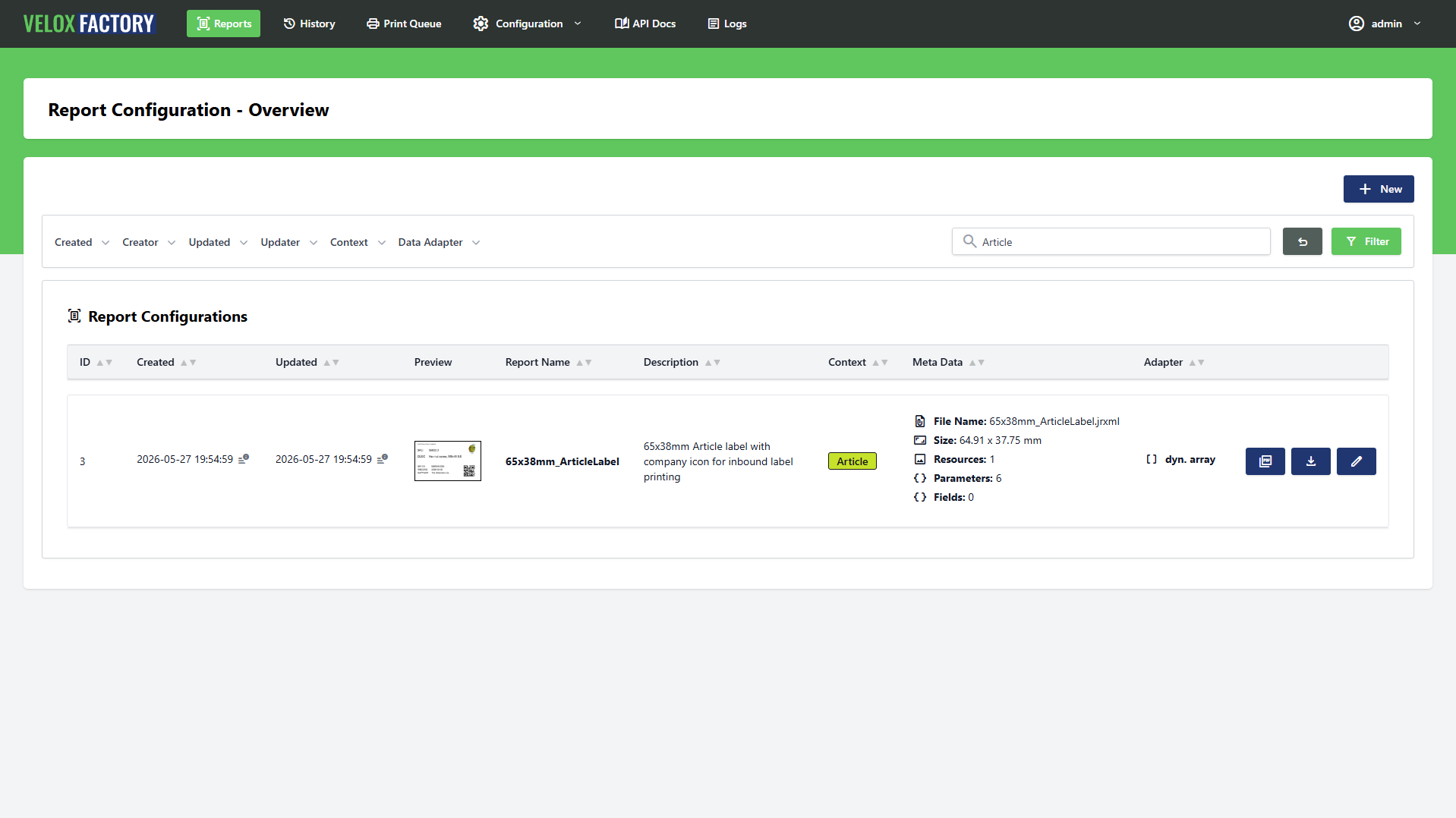
Every section opens with a list view — powered by a Livewire Lookup component. These views work the same way across all sections, so once you know one, you know them all.
Full-Text Search
A search bar at the top filters records instantly as you type — no page reload, no submit button. Depending on the section, the search covers names, descriptions, file names, and query text.
Column Filters
Each list view offers contextual filter dropdowns tailored to the entity. For Report Configs, for example, you can filter by Context, Data Adapter, Creator, or date ranges for creation and last update. Active filters are indicated by a badge count on the respective dropdown so you always see at a glance which filters are in play.
Pagination
Results are paginated. The default page size is controlled by the PAGINATION_DEFAULT_COUNT environment variable (default: 25). See Configuration and Data Models for all available environment settings.
Working with Report Configs
The Report Config section has the richest set of actions and is where most of your day-to-day work happens.
Uploading a Template
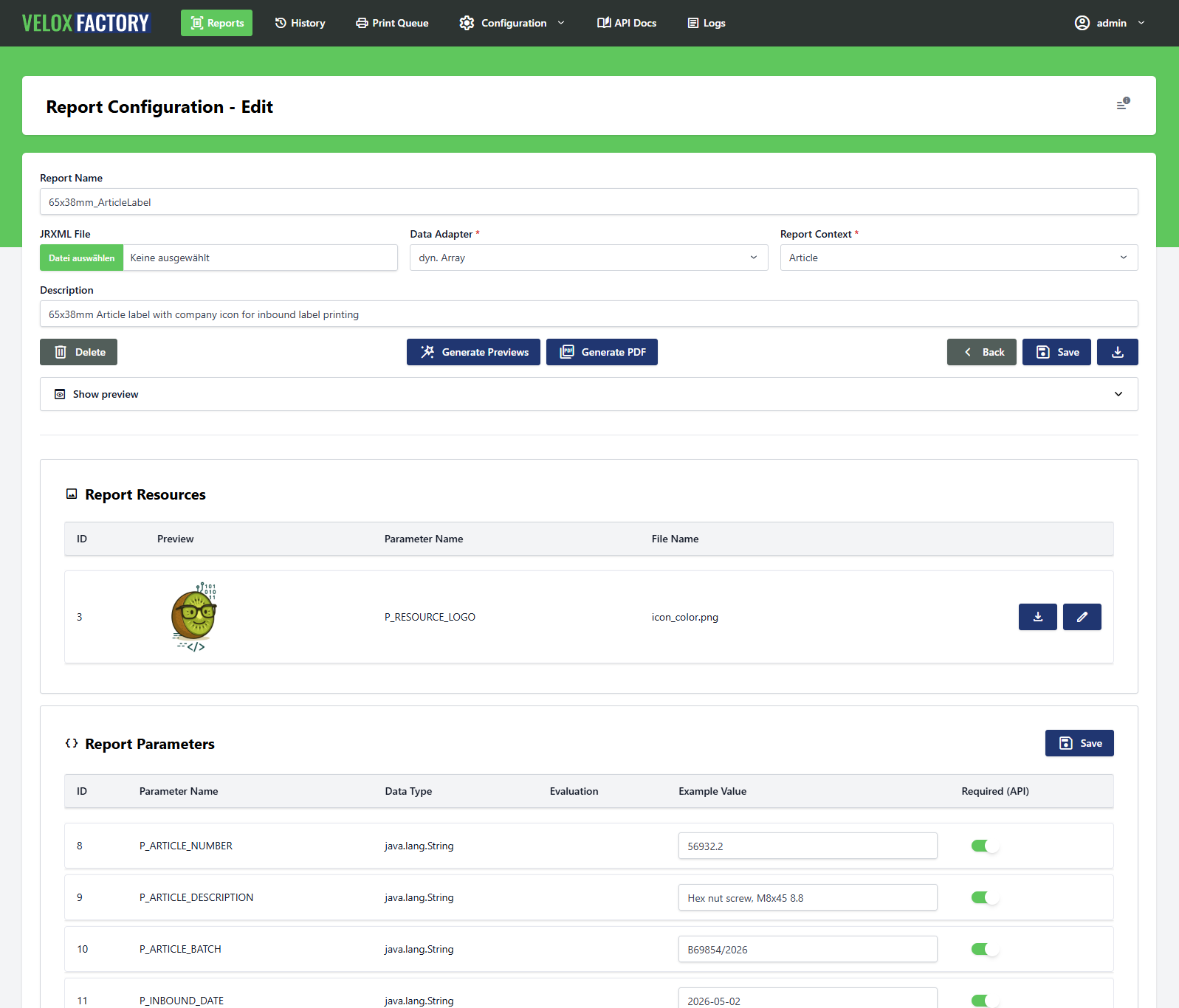
Report templates are designed in Jaspersoft Studio (compatible version: 6.21.5) and exported as .jrxml files. Once you have a .jrxml ready, you upload it to VeloxFactory to create a new Report Config. VeloxFactory immediately analyses the file and automatically creates all associated Parameters, Fields, and Resources — based on what is defined in the template. You do not need to add these manually.
After upload you review the auto-generated records: set example values where missing, assign a Data Adapter if the report uses SQL, and upload any resource files that were detected.
Managing Parameters, Fields, and Resources
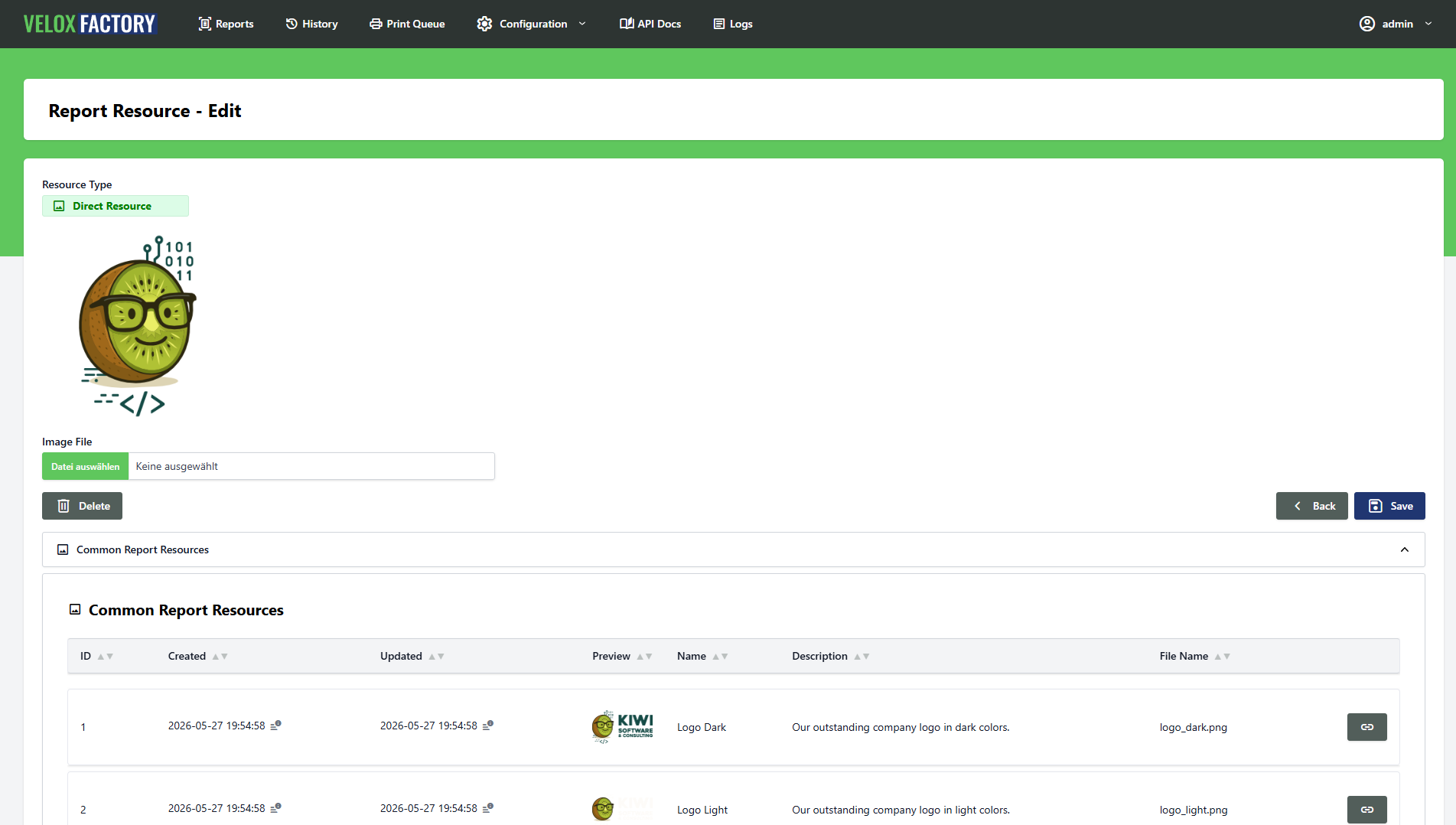
Parameters, Fields, and Resources each have their own section within the Report Config edit view. You can edit example values, mark parameters as required, upload resource files, or link a resource to a Common Report Resource — all from the same screen.
Generating Previews
Once all example values are set and all resource files are uploaded, you can generate a preview rendering directly from the edit view. VeloxFactory renders the report using the stored example values and stores the result as a preview image and thumbnail on the Report Config.
Rendering from the Frontend
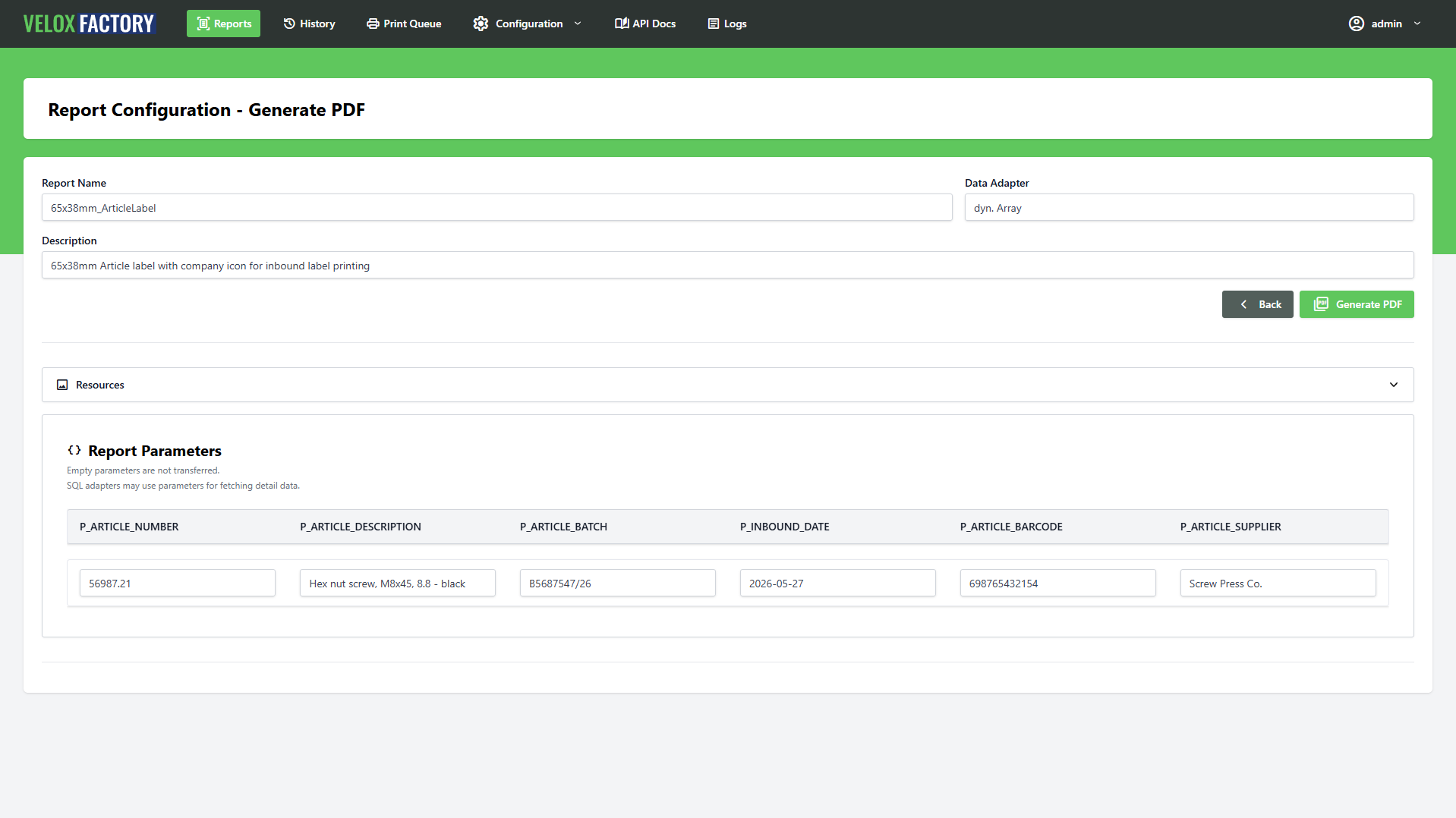
You can trigger a full render directly from the frontend — without touching the API. A render dialog lets you fill in parameter values, choose an output type, and optionally dispatch a print job in the same step. The result is shown inline and logged as a History Record if desired.
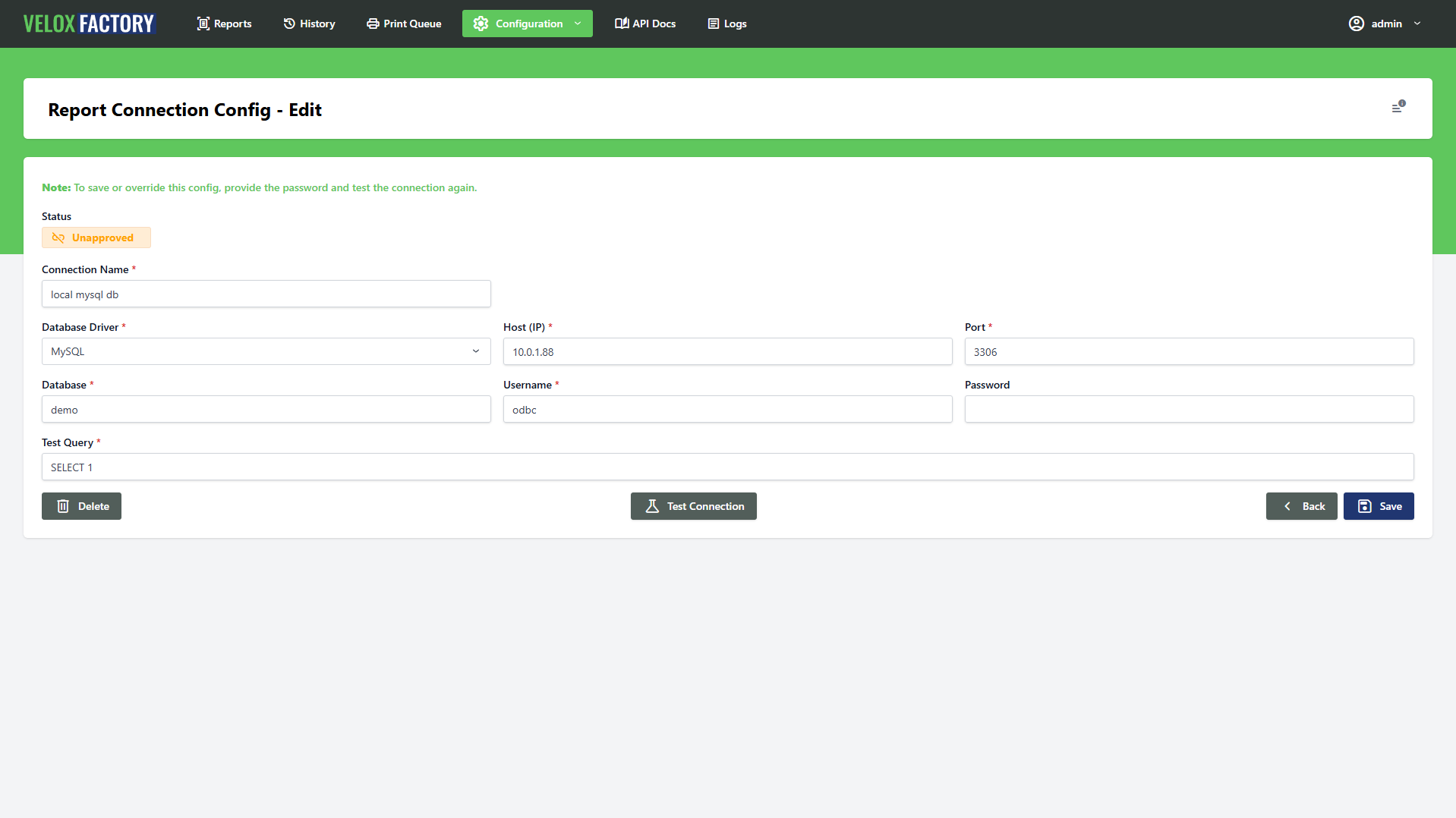
Report Connection Configs
When creating or editing a Connection Config, the form includes a Test Connection button. Use it before saving — a connection must be in status approved before VeloxFactory will use it for rendering. An untested or failed connection will cause render requests to be rejected.
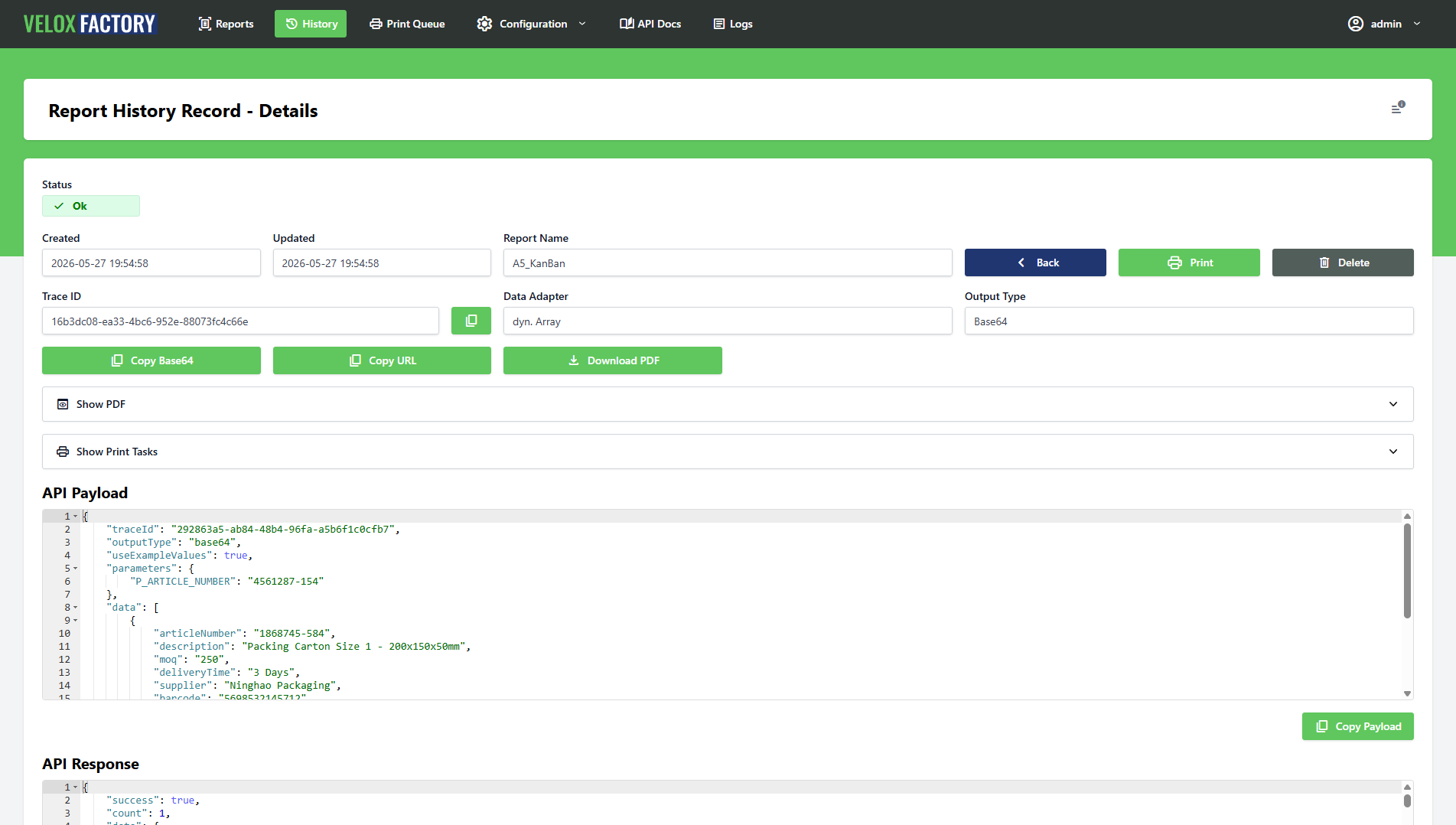
Report History Records
The History Records section gives you a full log of every rendering that was saved. For each record you can see the status, the exact parameters and data that were submitted, the raw JasperReports response, and — if the rendering succeeded — the resulting PDF.
From a History Record you can:
- Download the PDF directly to your browser
- Trigger a print job — creates a new Print Task for this specific rendering and dispatches it to the print service
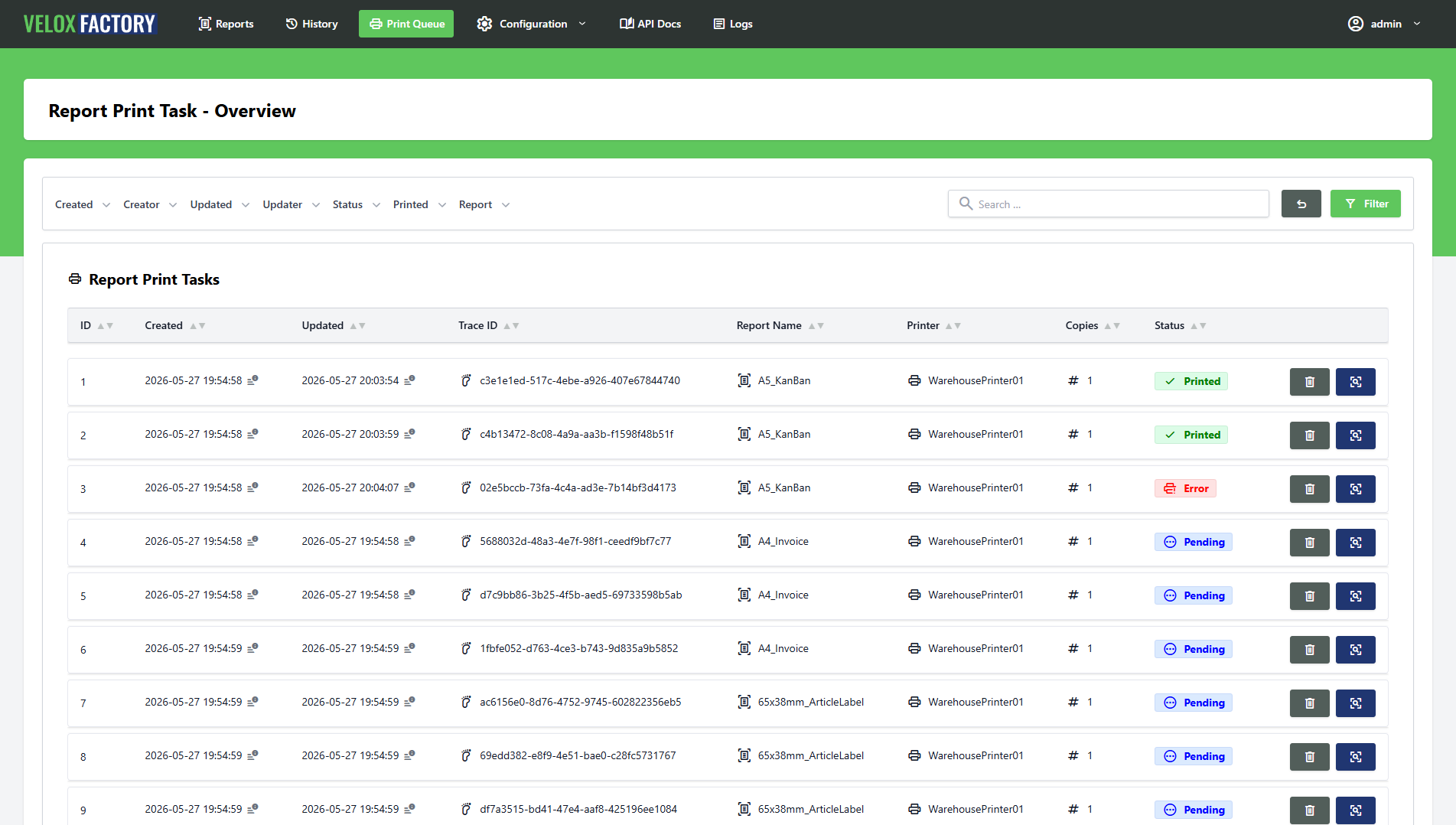
Report Print Tasks
The Print Tasks section shows all dispatched print jobs and their current status. For each task you can inspect the target printer, number of copies, and any error messages if printing failed.
If a task ended up in error state, you can reset it — the task returns to pending and the print service will pick it up again.
Users and API Tokens
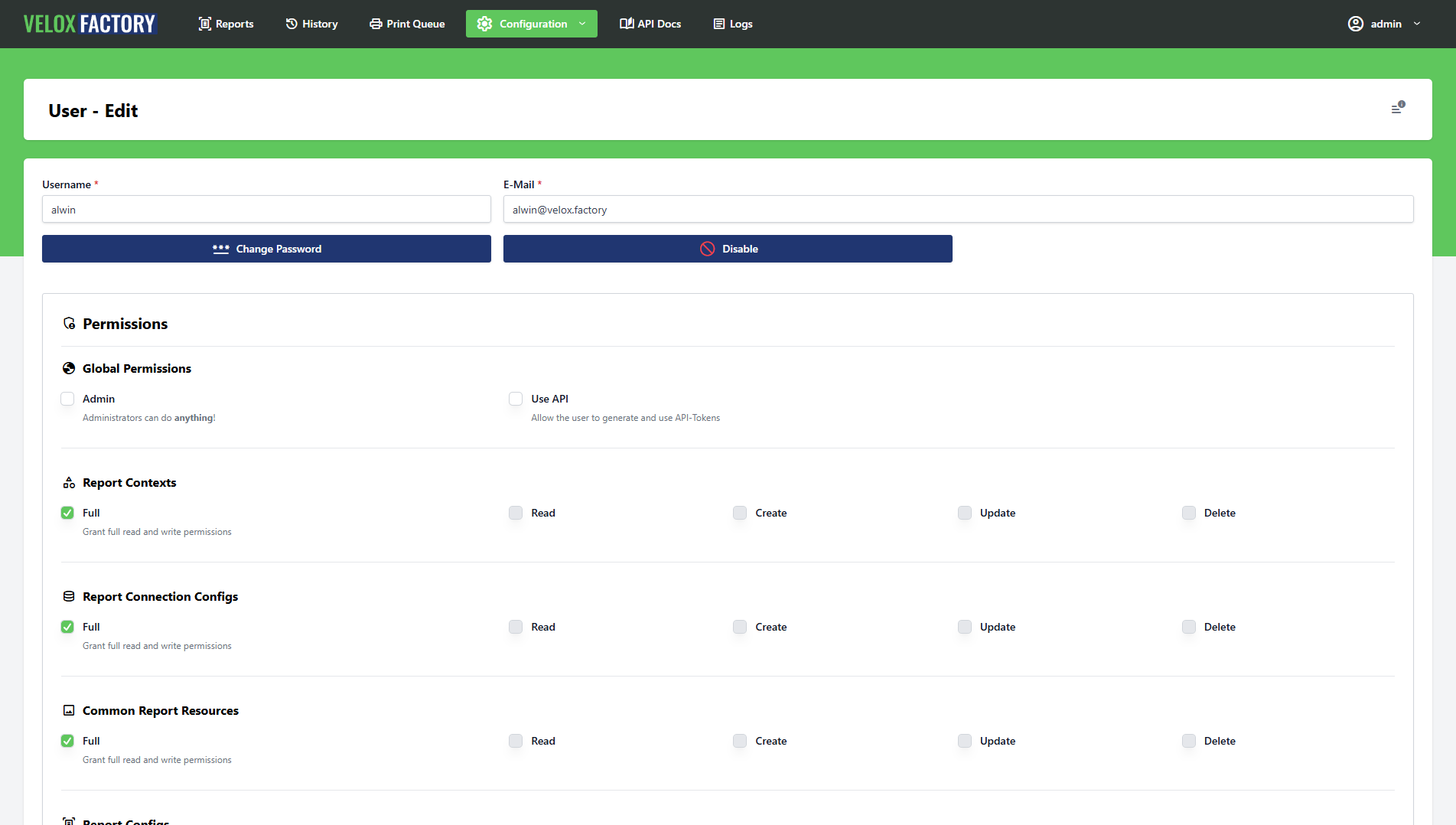
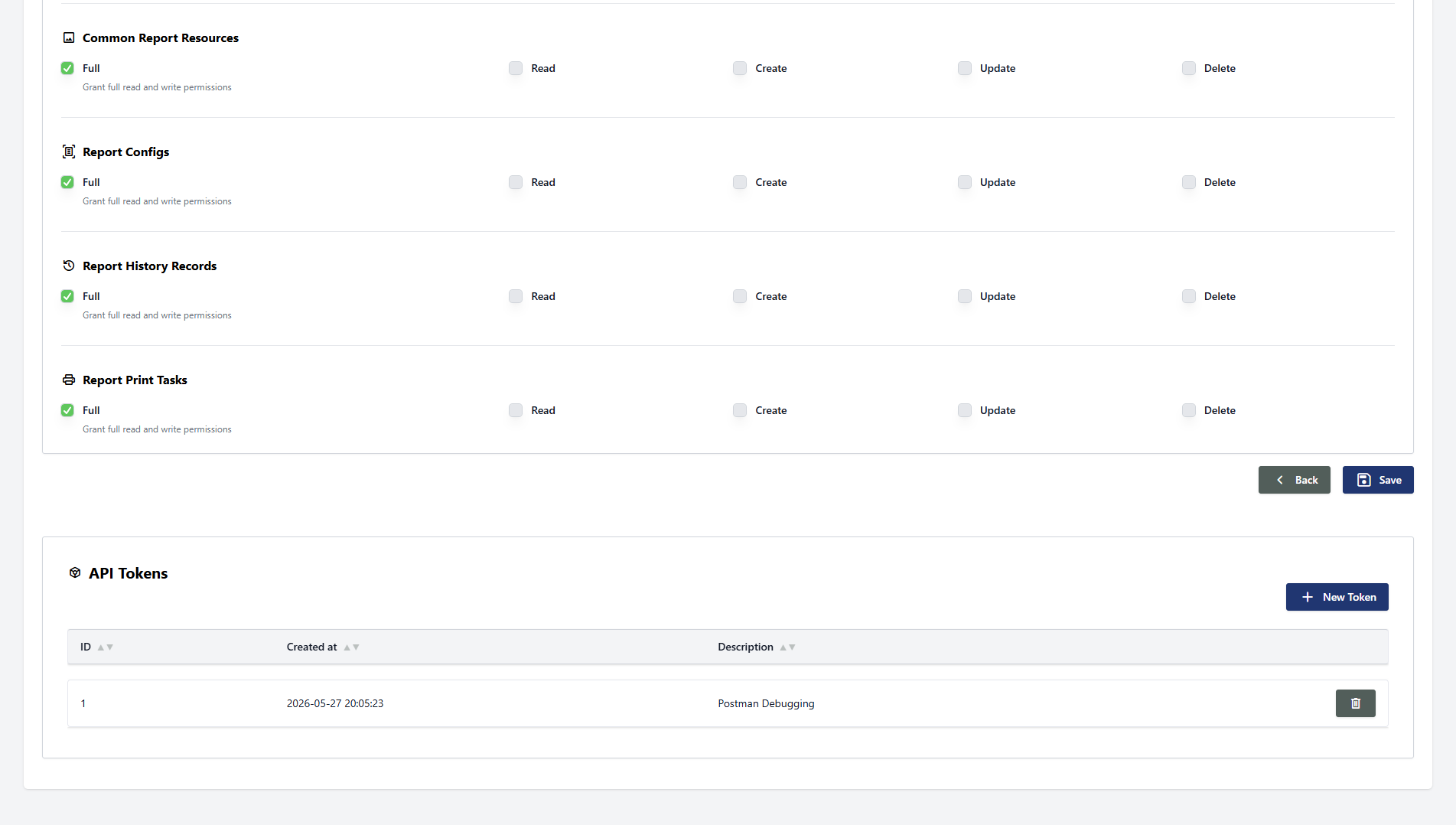
User accounts are managed under the Users section — accessible to administrators only. Each user can hold one or more named API tokens, which grant API access under that user's identity.
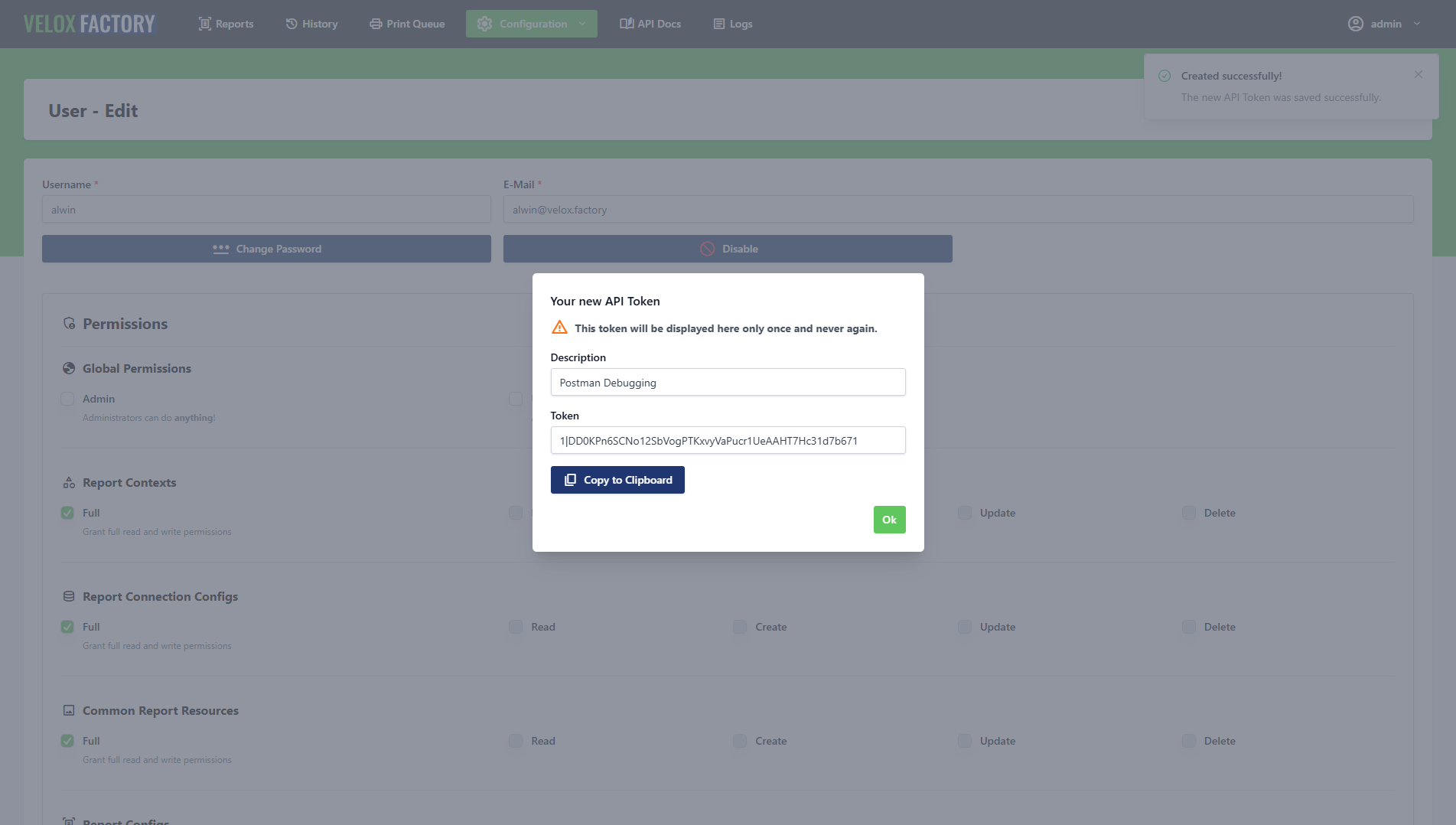
From the user edit view you can:
- Create a new token and copy it immediately after generation (it is only shown once)
- Revoke any existing token with immediate effect
Permissions
Every user in VeloxFactory has a set of permissions that controls what they can see and do — both in the frontend and via the API. Since both use the same underlying controllers, a permission that restricts an action in the frontend restricts the exact same action via API, and vice versa. There is no way to grant API-only or frontend-only access to a resource.
Permissions fall into two categories: global and per-resource.
Global permissions:
| Permission | Effect |
|---|---|
global:admin |
Full access to everything, including user management |
global:use-api |
Allows use of the API and management of own API tokens |
Per-resource permissions — available for each of the following resources: report-config, report-connection-config, report-context, report-history-record, report-print-task, common-report-resource:
| Permission | Effect |
|---|---|
<resource>:full |
Full read/create/update/delete access to this resource |
<resource>:read |
View records only |
<resource>:create |
Create new records |
<resource>:update |
Edit existing records |
<resource>:delete |
Delete records |
global:admin always implies full access to all resources and overrides any per-resource setting.
Frontend vs. API — What is the Difference?
The short answer: there is no feature difference. The frontend calls the exact same controller methods as the API. Everything you can do in the UI, you can also automate via API.
The frontend is optimised for interactive, human-driven workflows — exploring reports, reviewing history records, testing connections. The API is the right choice when you want to integrate rendering into external systems, automate repetitive tasks, or process results programmatically.
Meet the API
VeloxFactory ships with a fully capable REST API — and it is not an afterthought. Every action you can perform in the frontend can also be performed via the API, because the frontend and the API share the same controller methods. There is no separate implementation, no feature gap, no second-class citizen.
This makes the API a genuine alternative to the UI, not just an integration bolt-on. Automate report rendering in your CI pipeline, trigger prints from your ERP, manage report configurations programmatically — all with the same logic that powers the frontend you already know.
Login: demo@velox.factory · Password: demo
Authentication
The API uses token-based authentication via Laravel Sanctum. Every request must include a Bearer token in the Authorization header.
Authorization: Bearer your-api-token
Tokens are created and managed per user — either from the user management section in the frontend, or via the API itself (POST /api/v1/user/{id}/create-token). Each token can be revoked at any time. A revoked token is rejected immediately — there is no grace period.
{
"success": false,
"errors": ["This API token has been revoked."],
"status": 401
}
The audit trail records which token was used for every create and update operation across all models, so every API action is fully traceable.
Base URL
All API v1 endpoints are prefixed with:
/api/v1/
Response Structure
All API responses follow a consistent envelope format.
Success:
{
"success": true,
"count": 1,
"data": { ... },
"meta": [],
"status": 200
}
Error:
{
"success": false,
"errors": ["Descriptive error message"],
"meta": {},
"status": 404
}
The count field reflects the number of records in data — 1 for single-record responses, the actual number of returned records for collections. The meta field carries contextual information such as the traceId of a render run.
Query Parameters
Most GET endpoints and the render endpoint share a common set of query parameters that control what is included in the response. They are additive — combine them freely.
| Parameter | Type | Default | Description |
|---|---|---|---|
limit |
integer | 25 |
Maximum records to return. Set to 0 for all. |
withRelations |
boolean | false |
Include related models (e.g. parameters, fields, resources on a ReportConfig). |
recursiveRelations |
boolean | false |
Include nested relations within relations. |
withMedia |
boolean | false |
Include Base64-encoded file content, previews, and thumbnails. |
withAudit |
boolean | false |
Include the audit segment on each record (timestamps, users, token, method). |
Example — retrieve a single report config with all relations, media, and audit data:
GET /api/v1/report-config/1?withRelations=true&withMedia=true&withAudit=true
Audit Segment
When withAudit=true is set, every record in the response carries an audit block:
"audit": {
"createdAt": "2026-05-08 11:26:30",
"createdByUser": 2,
"createdByToken": null,
"creationMethod": "Frontend",
"updatedAt": "2026-05-08 13:31:35",
"updatedByUser": 1,
"updatedByToken": "Postman",
"updateMethod": "API"
}
creationMethod and updateMethod are derived automatically — "API" when a token was used, "Frontend" when the action came through the UI.
Render-Specific Request Body
The render endpoint (POST /api/v1/report-config/{id}/render) accepts the following fields in the request body (JSON).
| Field | Type | Required | Description |
|---|---|---|---|
outputType | string | ✅ | How to return the PDF: base64, url, preview, or none |
createHistoryRecord | boolean | ✅ | Whether to persist a ReportHistoryRecord for this render |
createPrintTask | boolean | ✅ | Whether to create a ReportPrintTask after rendering |
printerName | string | if createPrintTask | Name of the target printer |
useExampleValues | boolean | Use stored example values instead of supplying parameters manually | |
parameters | object | Key-value map of parameter names to values | |
data | array | Array of data rows — for reports without a live DB connection | |
numberOfCopies | integer | Number of print copies (default: 1) | |
broadcastId | string | WebSocket channel ID — triggers real-time status updates for the print task | |
traceId | string | Custom trace ID; auto-generated as UUID if omitted | |
laconicResponse | boolean | Strip the response to just the PDF output (see below) |
none requires createPrintTask: true. Rendering without any output and without a print task is rejected.
Laconic Responses
By default, a render response is fully populated — it includes the echoed input, the PDF output, the linked ReportConfig, the created ReportHistoryRecord, and the ReportPrintTask if applicable. In high-frequency or bandwidth-sensitive scenarios, add laconicResponse=true to strip everything down to just the PDF output.
Rate Limiting
The API enforces a configurable rate limit per token. The default is 10 requests per minute. When the limit is exceeded:
{
"success": false,
"message": "Too many requests! The current rate limiting is 10 requests per minute.",
"status": 429
}
The limit is adjusted via the API_RATE_LIMIT_PER_MINUTE environment variable — see Configuration and Data Models.
Endpoints Overview
| Resource | Available operations |
|---|---|
| User | List, show, create, update, change password, enable/disable, create/revoke tokens |
| ReportContext | List, show, create, update, delete |
| ReportConnectionConfig | List, show, create, update, delete, test connection |
| CommonReportResource | List, show, create, update, delete |
| ReportConfig | List, show, create, update, delete, update resources / parameters / fields, generate previews, render |
| ReportResource | Link / unlink CommonReportResource |
| ReportHistoryRecord | List, show, create, update, delete, print |
| ReportPrintTask | List, show, create, update, delete, set printed, set status |
A Practical Example: The Full Render Response
A render call returns a ReportRendering object. By default it is fully populated — you see the input you sent, the PDF output, and the linked records that were created.
{
"success": true,
"count": 1,
"data": {
"model": "ReportRendering",
"traceId": "a3f9c1d2-4e87-4b2a-9f1c-d3e8b7a20f61",
"input": {
"parameters": {
"P_ARTICLE_NUMBER": "4561287-154"
},
"data": null
},
"output": {
"reportPdfFileName": "a3f9c1d2-4e87-4b2a-9f1c-d3e8b7a20f61.pdf",
"reportPdfBase64": "JVBERi0xLjQ...",
"reportUrl": null
},
"reportConfig": { "..." },
"reportHistoryRecord": { "..." },
"reportPrintTask": null
},
"meta": {
"traceId": "a3f9c1d2-4e87-4b2a-9f1c-d3e8b7a20f61"
},
"status": 200
}
Add laconicResponse=true and the response collapses to just output — no echoed input, no embedded related records. Ideal for automated pipelines that only need the PDF.
Try it out
The demo instance gives you a fully functional VeloxFactory environment — pre-loaded with report templates and example data. Everything you can do in a production setup you can do here, with one exception: print tasks do not reach a real printer.
Access
The demo account has full access to all report data — Report Configs, History Records, Print Tasks, Connection Configs, Contexts, and Common Resources. It can also generate and use API tokens. User management is not available.
Guided Tour
Work through these steps in order for a complete first look at VeloxFactory.
Step 1 — Browse the Report Configs
After logging in you land on the Report Configs list. This is the central workspace. Each card shows a thumbnail preview of the report and its context badge.
Use the search bar to filter by name, or use the dropdown filters to narrow by context or data adapter. Try typing part of a report name — the list updates instantly, no page reload.
Step 2 — Explore a Report Config
Click any report to open its detail view. Here you can inspect:
- Parameters — the inputs the report expects at render time, with their data types and example values
- Fields — the data columns that populate the report body
- Resources — image assets embedded in the template (logos, icons)
- Preview — the rendered thumbnail, generated from the stored example values
Scroll through the sections to get a feel for what VeloxFactory extracts from a .jrxml file automatically on upload.
Step 3 — Render a Report from the Frontend
From within a Report Config, click the Generate PDF button. A dialog opens with pre-filled parameter values (taken from the example values stored on the config). You can edit any of them before rendering.
Select an output type — Base64 is fine for a quick look — and click Generate PDF. VeloxFactory processes the request and shows the resulting PDF inline within seconds. No API call needed, no setup required.
Step 4 — Check the History Record
Navigate to Report History Records. Your render from Step 3 appears at the top of the list (if you left createHistoryRecord enabled in the dialog). Open it to see the full log: the exact request payload, the API response, the rendered PDF, and a thumbnail.
From here you can download the PDF directly or trigger a reprint — which creates a new Print Task.
Try It Yourself
Once you have completed the tour, these are good next things to explore on your own.
Upload Your Own Template
If you have a .jrxml file designed in Jaspersoft Studio, you can upload it directly to the demo. Go to Report Configs → Create, attach the file, and let VeloxFactory analyse it. Within seconds, all parameters, fields, and resources are detected and listed automatically.
After upload, set any missing example values, upload resource files if needed, and click Generate Preview to produce a thumbnail. The report is then ready to render.
Call the API Directly
The demo account has API access enabled. To get a token, open the user menu in the top right corner and go to Account Settings → API Tokens — copy it immediately, it is only shown once.
With the token in hand, render any report with a single HTTP request:
curl -X POST \
https://demo.veloxfactory.kiwi-software.dev/api/v1/report-config/{reportName}/render \
-H "Authorization: Bearer <your-token>" \
-H "Content-Type: application/json" \
-d '{
"outputType": "base64",
"useExampleValues": true,
"createHistoryRecord": true
}'
Replace {reportName} with the report_name of any config from the list (visible in the detail view). The useExampleValues flag tells VeloxFactory to use the stored example values instead of requiring you to pass parameters and data manually — ideal for a first test.
The response contains the rendered PDF as a Base64 string and a trace ID you can look up in History Records.
Explore Print Tasks
When rendering via the frontend or API, enable the print task option and provide any printer name (e.g. demo-printer). VeloxFactory creates a ReportPrintTask record with status pending. Since no print service is connected to the demo, the task stays pending — but you can inspect the full record and see how status tracking works. Completed print tasks are purged automatically after a configurable retention period.
Demo Limitations
| What | Behaviour in the demo |
|---|---|
| Print tasks | Created and traceable, but no real printer connected — tasks remain pending. Completed tasks are purged automatically. |
| Live SQL connections | Connection Configs can be created and tested, but no external databases are reachable from the demo environment. |
| User management | The demo account does not have admin rights — user accounts and permissions cannot be managed. |
| Data persistence | Uploaded templates, history records, and other data may be reset periodically. |
Open Source Attribution
VeloxFactory and its companion Background Printing Service are built on open source software. We are grateful to the authors and contributors of the following packages.
VeloxFactory
| Package | License | Description |
|---|---|---|
| laravel/framework | MIT | The Laravel PHP framework — routing, ORM, queues, and the application foundation. |
| laravel/reverb | MIT | First-party Laravel WebSocket server — used to broadcast print task events in real time. |
| laravel/sanctum | MIT | API token authentication for the VeloxFactory REST API. |
| laravel/tinker | MIT | REPL for the Laravel application. |
| livewire/livewire | MIT | Full-stack component framework for the VeloxFactory frontend. |
| opcodesio/log-viewer | MIT | In-browser Laravel log viewer. |
| knuckleswtf/scribe | MIT | Automatic API documentation generator. |
| quilhasoft/jasperphp | MIT | Pure-PHP JasperReports renderer — the engine that compiles .jrxml templates and produces PDFs without a Java runtime. |
Background Printing Service
| Package | License | Description |
|---|---|---|
| PdfiumViewer | Apache 2.0 | .NET wrapper around the PDFium library — used to render and send PDFs to Windows printers. |
| PDFium | BSD 3-Clause | Google's PDF rendering engine, bundled as a native binary via PdfiumViewer.Native.x86_64.v8-xfa. |
| RestSharp | Apache 2.0 | HTTP client library for all API communication with VeloxFactory. |
| Newtonsoft.Json | MIT | JSON serialisation and deserialisation for API responses and WebSocket messages. |
| Serilog | Apache 2.0 | Structured logging to console and rolling file (Serilog.Sinks.Console, Serilog.Sinks.File). |
Get VeloxFactory
Interested in using VeloxFactory in your own environment? Get in touch — we'll figure out the right setup together.
Contact
| Name | Benjamin Fischer |
| bfischer@kiwi-software.dev | |
| Website | www.kiwi-software.dev |
What to Expect
Drop a short message explaining your use case — what you need to generate, how often, and whether you'd prefer self-hosted or managed. You'll hear back within one business day.
If you want to explore the product first, the live demo is open:
Login: demo@velox.factory · Password: demo
Report Configurations
Creating reports in Jaspersoft Studio
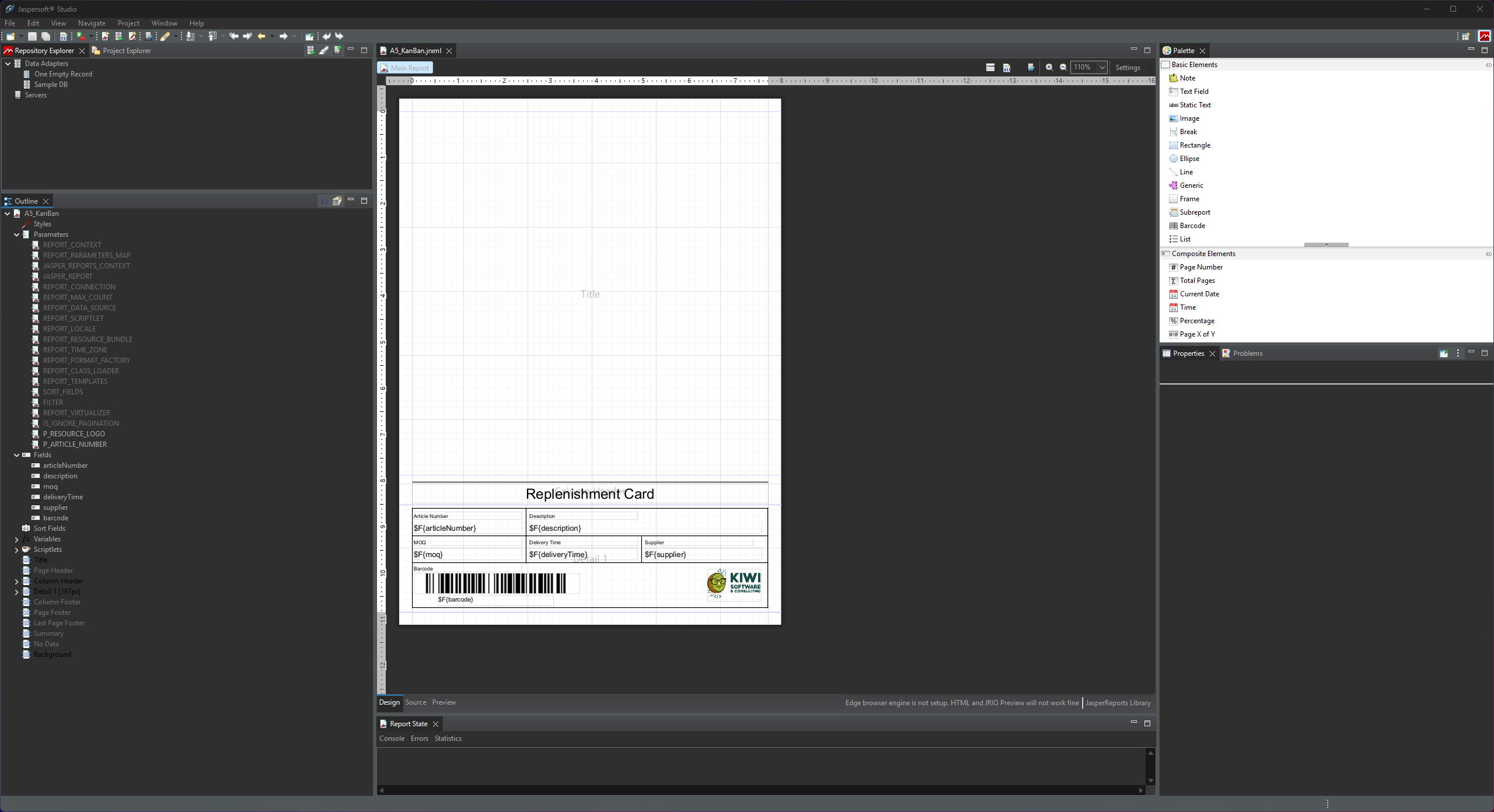
VeloxFactory renders reports defined as .jrxml files — the native format of JasperReports. These files are designed in Jaspersoft Studio, a free desktop IDE built specifically for this purpose. This page explains how to set up a .jrxml file so that VeloxFactory can analyse it correctly, register all its parts, and render it reliably.
Jaspersoft Studio
Jaspersoft Studio is an Eclipse-based visual report designer. You use it to lay out the report template — define what data goes where on the page, how it is formatted, and which inputs the report expects. The resulting .jrxml file is then uploaded to VeloxFactory, which takes over everything from there: storing it, analysing it, connecting it to a data source, and rendering it on demand.
The division of responsibilities between Jaspersoft Studio and VeloxFactory is clear:
- Jaspersoft Studio defines the layout, the parameters, the fields, and the visual design of the report.
- VeloxFactory manages the SQL query, the data connection, and the actual rendering at runtime.
This means you will see a <queryString> element in Jaspersoft Studio — but as explained below, you leave it empty. VeloxFactory supplies the query separately.
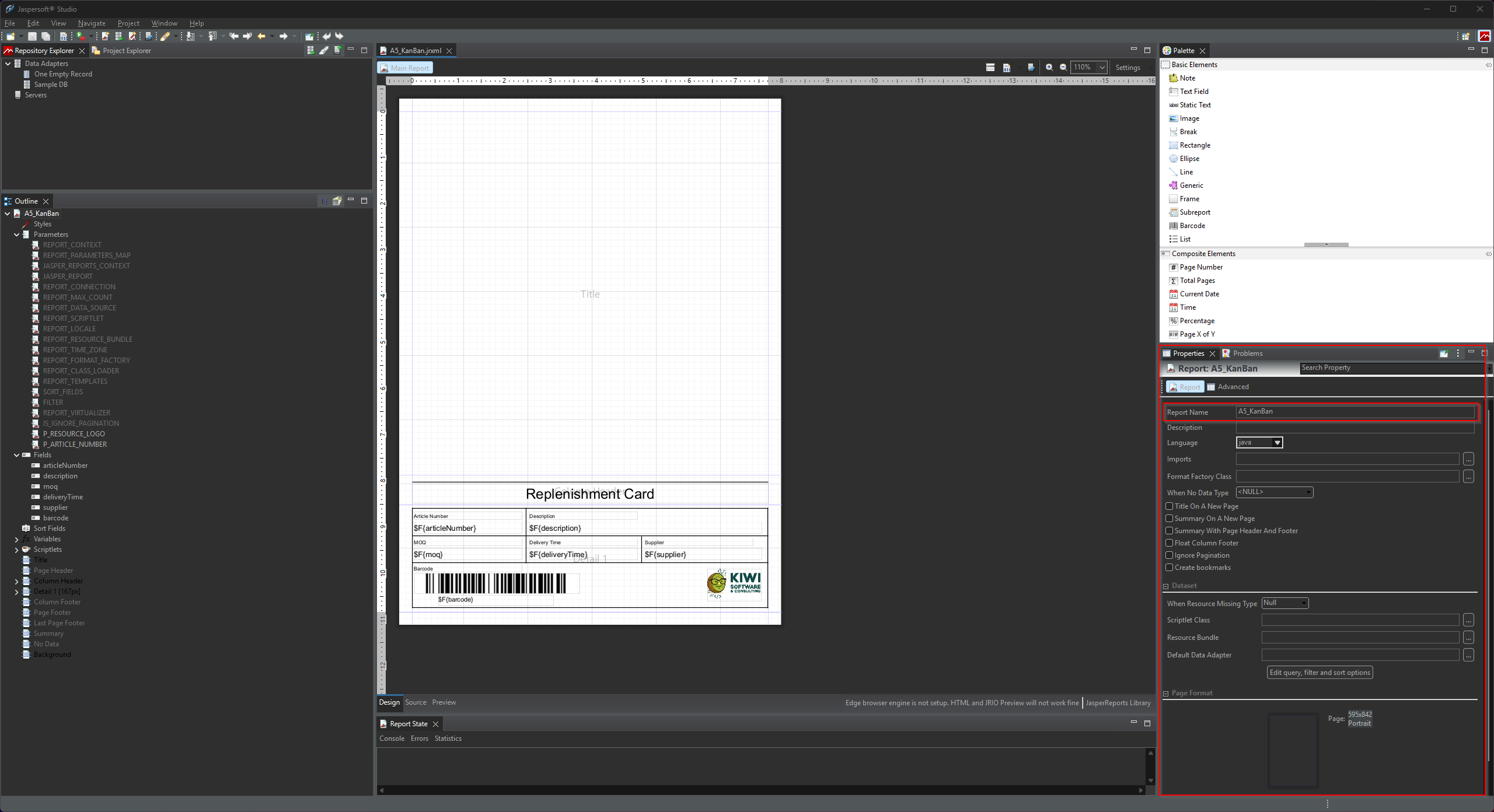
The Report Name
Every Jaspersoft Studio project has a Report Name — the name attribute on the root <jasperReport> element. This is not just a filename: VeloxFactory reads it directly from the .jrxml on upload and stores it as report_name on the ReportConfig.
<jasperReport ... name="A5_KanBan" ...>
This name must be unique across all report configurations in VeloxFactory. If you try to upload a .jrxml whose report name already exists, the upload will be rejected. The same applies to the file name itself.
Parameters
Parameters are input values passed into the report at render time. They are used inside the report layout via $P{PARAMETER_NAME} expressions — for example to display a customer name in the title, filter by a date range, or pass a document number into a barcode expression.
You define parameters in Jaspersoft Studio via the Report Inspector → Parameters section. Each parameter has a name and a Java data type.
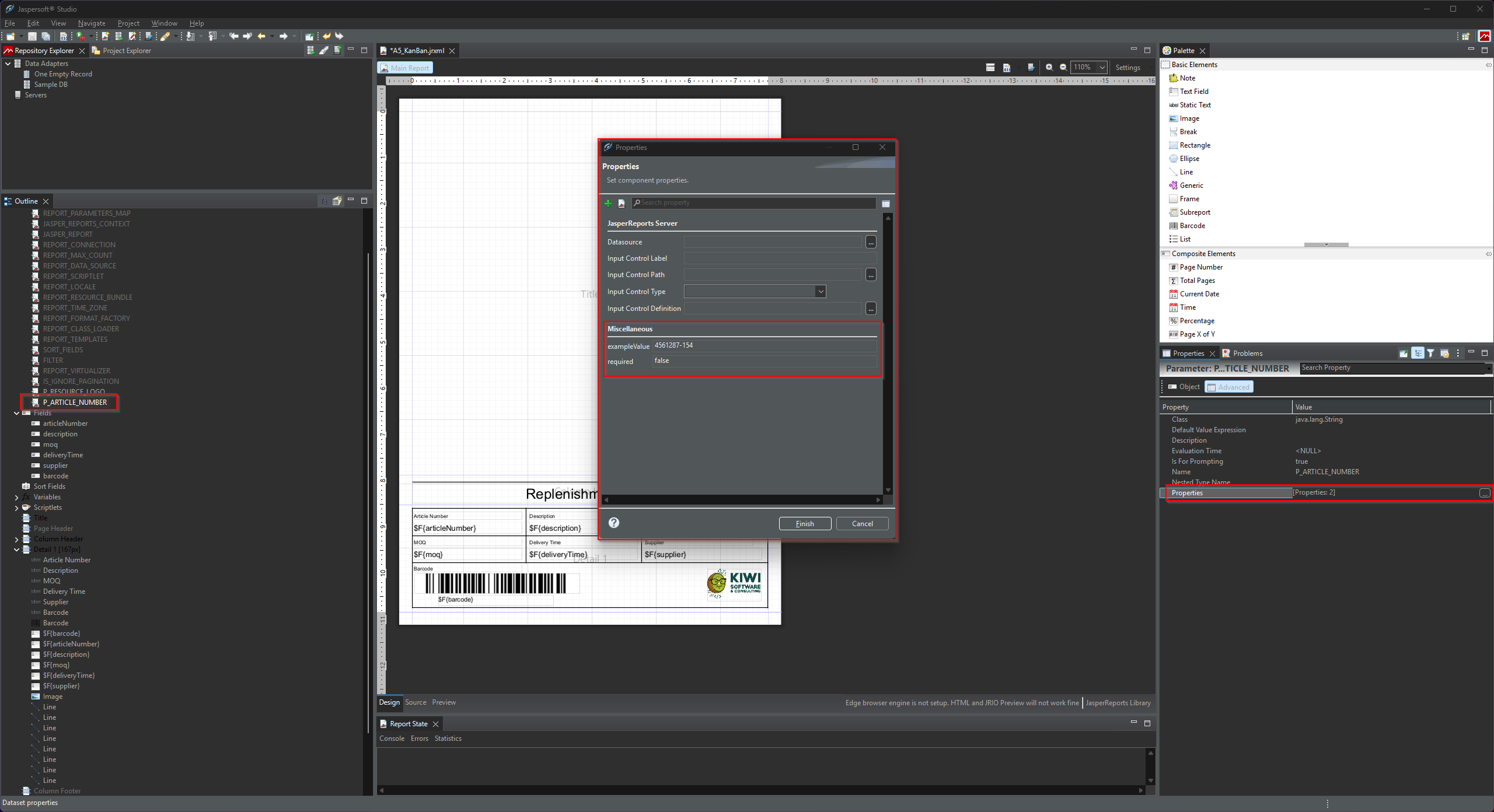
Custom Properties: exampleValue and required
VeloxFactory reads two custom properties from each parameter definition: exampleValue and required. These are not standard Jaspersoft features — they are custom <property> elements you add manually to the parameter in the .jrxml. VeloxFactory's analyser (JasperFunctions::analyzeReportFile) extracts them on upload.
| Property | Value type | Purpose |
|---|---|---|
exampleValue |
string | A representative value used when rendering a preview of the report without real data. Also pre-fills the parameter input in the frontend render form. |
required |
boolean (true / false) |
Whether this parameter must be provided in every render request. VeloxFactory rejects render requests that are missing a required parameter. |
Both properties can also be set or updated manually in VeloxFactory after upload — they do not have to come from the .jrxml. But embedding them in the file means they are automatically picked up every time the report is uploaded or re-uploaded.
To add these properties in Jaspersoft Studio, open the parameter in the Report Inspector, switch to the Properties panel, and add a new custom property via the green + button.
Supported Data Types
VeloxFactory supports the following Java class types for parameters. The type determines how the input field is rendered in the frontend and how the value is handled at render time.
| Java class | Frontend input | Notes |
|---|---|---|
java.lang.String |
Text field | General-purpose text input |
java.lang.Boolean |
Toggle | Rendered as a checkbox/toggle switch |
java.lang.Short |
Integer input | Range: −32,768 to 32,767 |
java.lang.Integer |
Integer input | Range: −2,147,483,648 to 2,147,483,647 |
java.lang.Long |
Integer input | 64-bit integer |
java.lang.Float |
Decimal input | Single-precision floating point |
java.lang.Double |
Decimal input | Double-precision floating point |
java.math.BigDecimal |
Decimal input | Arbitrary-precision decimal; preferred for monetary values |
java.sql.Date |
Date picker | Date only (no time) |
java.util.Date |
Date picker | Date only (no time) |
java.sql.Time |
Time picker | Time only (HH:mm) |
java.sql.Timestamp |
Date + time picker | Combined date and time (datetime-local) |
Fields
Fields represent the data columns that populate the report's detail band — the repeating section that produces one row of output per data record. Each field corresponds to a column in the SQL query result (when using a live connection) or a key in the data array delivered at render time via the API.
You define fields in Jaspersoft Studio via the Report Inspector → Fields section. In the report layout, you reference them via $F{FIELD_NAME} expressions inside text fields in the detail band.
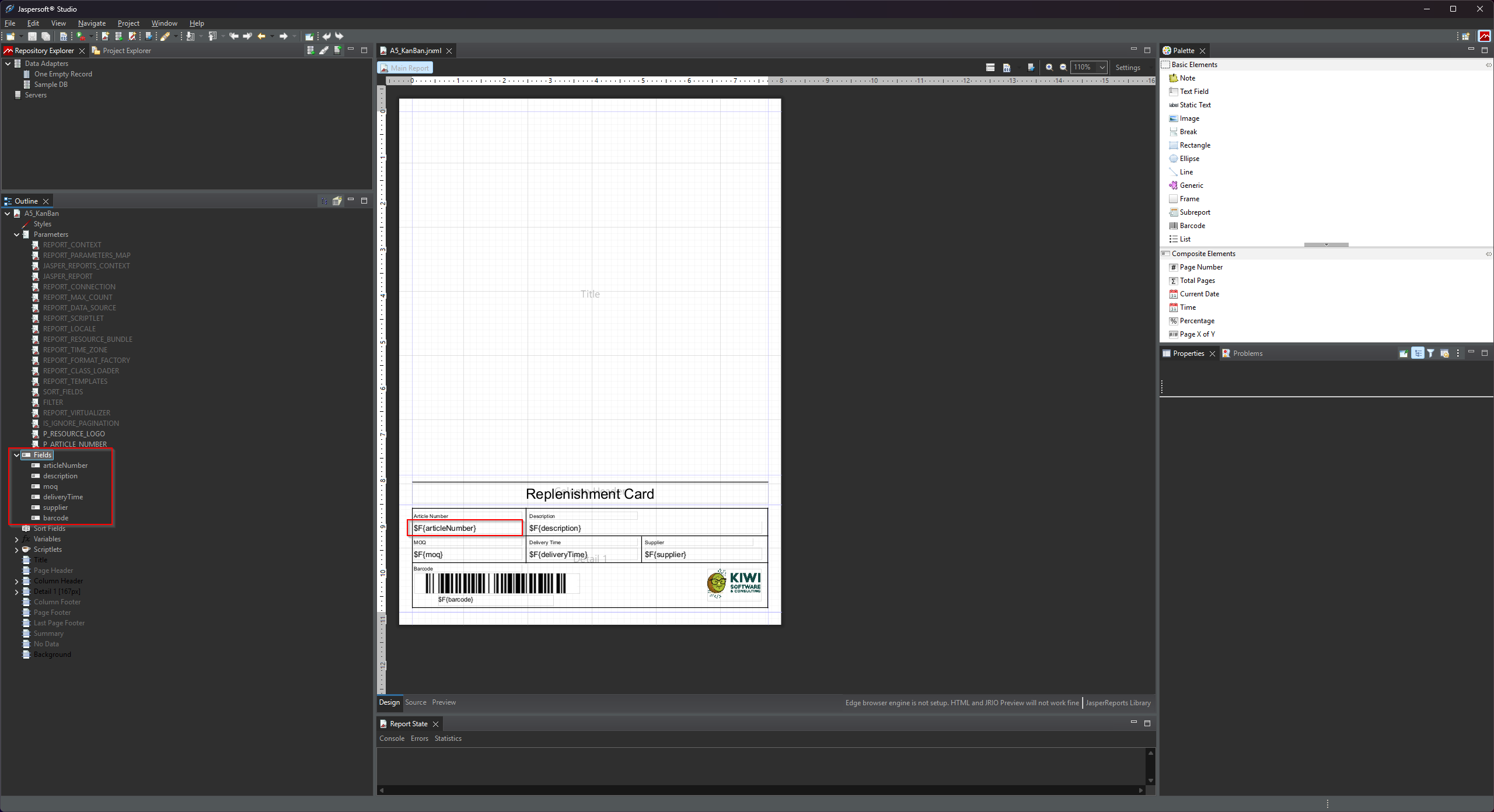
Custom Property: exampleValue
Fields support one custom property: exampleValue. It works the same way as for parameters — a representative value used when rendering a preview of the report without a live data connection. VeloxFactory collects these example values and assembles a synthetic data row from them for preview rendering.
You add exampleValue to a field the same way as for parameters: open the field in the Report Inspector, go to the Properties tab, and add the custom property.
Fields support the same Java data types as parameters (see the table above). Use the type that matches the column type your SQL query or data array will produce.
Using Parameters as SQL Variables
When a ReportConfig has a ReportConnectionConfig assigned, VeloxFactory executes the SQL query defined in the report configuration against that live database connection. Parameters passed in the render request are available as named bindings inside that query — using the standard :parameterName syntax from Laravel's Eloquent database layer.
This means you can reference any parameter directly in your SQL to filter, sort, or limit the result set:
SELECT
article_number AS articleNumber,
description,
moq,
delivery_time AS deliveryTime,
supplier,
barcode
FROM articles
WHERE article_number = :P_ARTICLE_NUMBER
In this example, :P_ARTICLE_NUMBER is replaced at query execution time with the value of the P_ARTICLE_NUMBER parameter from the render request. The binding is handled natively by PDO — values are passed as proper prepared statement parameters, not interpolated as strings.
:name placeholders before execution and silently drops any parameters that are not needed. Passing extra parameters in the render request will never cause a query error.
The parameter name in the query binding must match the parameter name exactly as defined in the .jrxml — including case. For example, a parameter named P_ARTICLE_NUMBER in the report must be referenced as :P_ARTICLE_NUMBER in the SQL query.
You can use as many parameters as needed across WHERE, ORDER BY, LIMIT, or any other clause that accepts a value binding. Note that named bindings cannot be used for identifiers like table or column names — only for values.
Resources (Images and Logos)
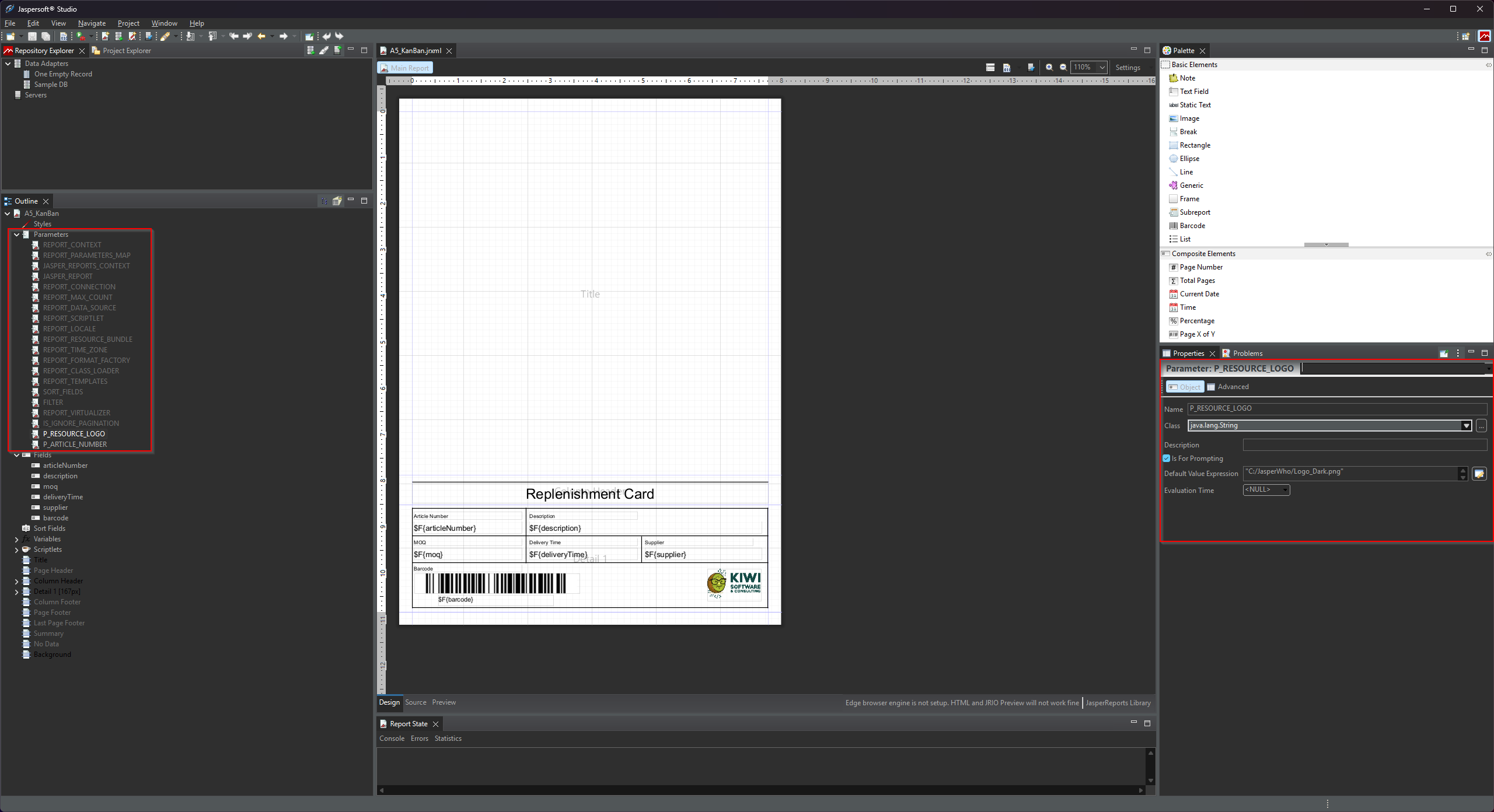
If your report contains images — a company logo, a header graphic, a product photo — these are defined as resource parameters in the .jrxml. VeloxFactory detects them automatically on upload and creates a ReportResource record for each one.
The naming convention is strict: every resource parameter must start with P_RESOURCE_ and must have the Java class java.lang.String. At render time, VeloxFactory replaces the parameter value with the actual file path of the uploaded image on the server.
<!-- Resource parameter: logo image -->
<parameter name="P_RESOURCE_LOGO" class="java.lang.String">
<defaultValueExpression><![CDATA["C:/VeloxFactory/Logo_Dark.png"]]></defaultValueExpression>
</parameter>
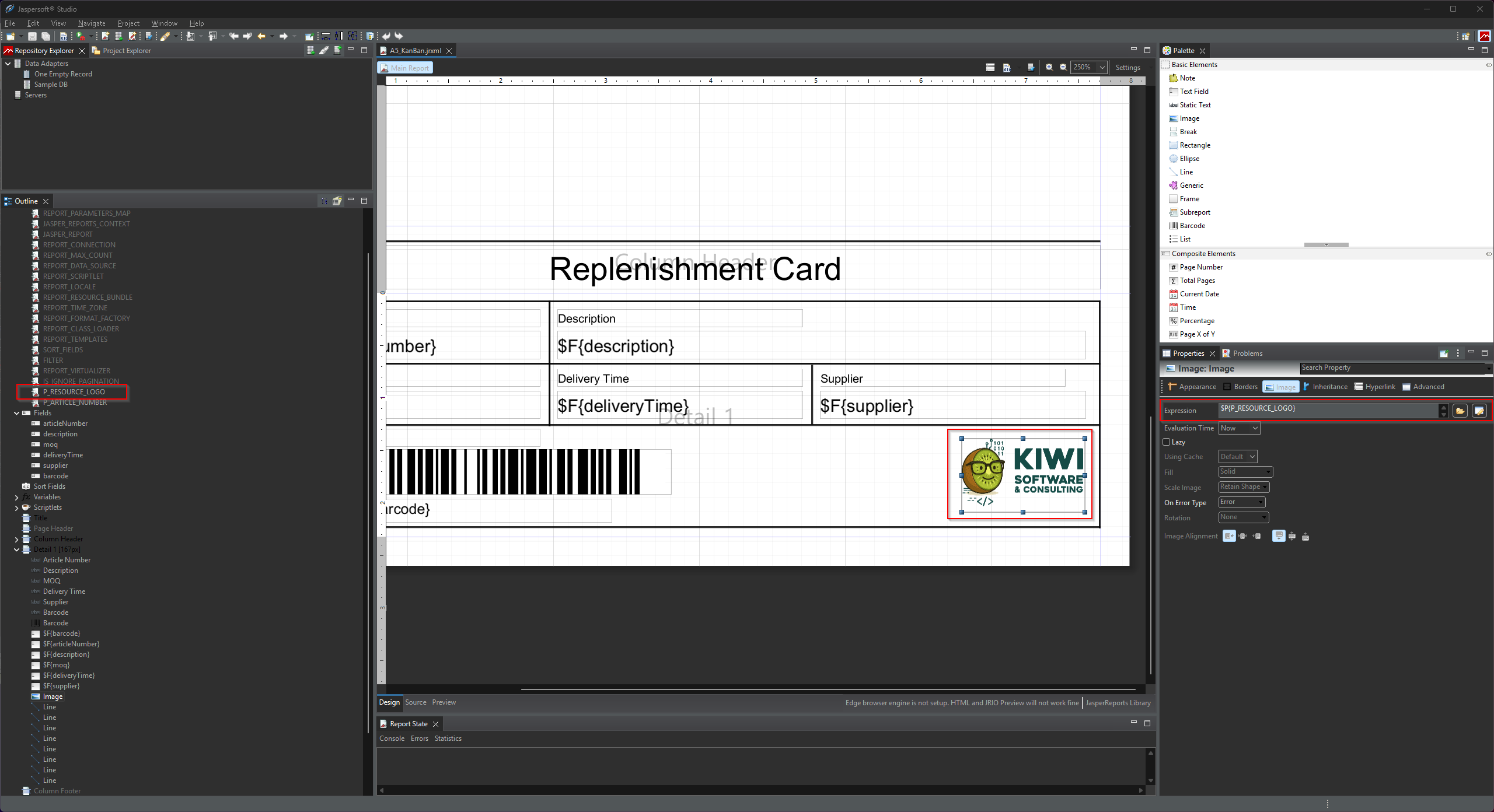
In the report layout, you then bind this parameter to an image element:
<image>
<reportElement x="460" y="100" width="84" height="50" uuid="..."/>
<imageExpression><![CDATA[$P{P_RESOURCE_LOGO}]]></imageExpression>
</image>
The <defaultValueExpression> is used only in Jaspersoft Studio for design-time preview purposes. VeloxFactory ignores it at render time — it always uses the uploaded file path instead. You can point it to a local file on your design machine.
After uploading the .jrxml, you must go to the Resources section of the report configuration in VeloxFactory and upload the actual image file for each detected resource. A report cannot be rendered until all its resources have files assigned.
The Detail Band
The detail band is the repeating section of the report — the part that outputs one row per data record. If your report displays a list of items, a table, or any kind of repeating structure, it lives in the detail band.
VeloxFactory checks whether a detail band is present when analysing the .jrxml:
- If a detail band exists, VeloxFactory expects data to be provided at render time — either via a live SQL connection or via the
dataarray in the API request. - If no detail band exists, the report is treated as a static layout — no data is needed, only parameters.
$F{...}). A detail band that exists but displays no field data will be rejected on upload. VeloxFactory uses the presence of text fields in the band as a basic integrity check.
Reports without a detail band are perfectly valid — they are useful for documents like cover pages, summary sheets, or any report whose content is entirely driven by parameters rather than repeated rows.
The SQL Query
Jaspersoft Studio has a built-in <queryString> element where you would normally write the SQL query for the report. In VeloxFactory, this element is ignored. The SQL query is instead defined and stored directly in VeloxFactory as part of the ReportConfig — not in the .jrxml file.
This means you should leave the <queryString> empty when creating a .jrxml for VeloxFactory:
<queryString>
<![CDATA[]]>
</queryString>
You write the actual SQL query in VeloxFactory after uploading the report, in the Query field of the report configuration. This design keeps the query where it can be managed, versioned, and changed without touching the report template file.
The query result columns must match the field names you defined in the .jrxml. For example, if your report has a field named articleNumber, your SQL query must return a column called articleNumber.
The Data Adapter
Jaspersoft Studio uses Data Adapters to connect to a live database so you can preview your report during design. This is entirely a design-time feature — the data adapter you configure in Jaspersoft Studio has no effect in VeloxFactory and is not stored in the .jrxml.
At render time, VeloxFactory always uses its own internal array-based adapter to pass data to JasperReports. Whether that data comes from an SQL query executed against a ReportConnectionConfig or from a data array in the API request, VeloxFactory always handles the data handoff itself.
You still benefit from configuring a data adapter in Jaspersoft Studio during development — it lets you see a realistic preview while designing the layout. Just be aware that the adapter configuration stays local to your machine.
Annotated Example
The following is a complete, minimal .jrxml that demonstrates everything discussed on this page. It is the actual A5_KanBan report included in the VeloxFactory demo. Inline comments explain each relevant element.
<?xml version="1.0" encoding="UTF-8"?>
<!-- Created with Jaspersoft Studio version 6.21.5 -->
<jasperReport
xmlns="http://jasperreports.sourceforge.net/jasperreports"
xmlns:xsi="http://www.w3.org/2001/XMLSchema-instance"
xsi:schemaLocation="..."
name="A5_KanBan" <!-- Report Name — becomes report_name in VeloxFactory. Must be unique. -->
pageWidth="595" <!-- Page dimensions in Jasper pixels (1px = 1/72 inch). -->
pageHeight="842" <!-- VeloxFactory converts these to mm on upload. -->
...>
<!-- ═══════════════════════════════════════════════════════════════════
RESOURCE PARAMETER
Name starts with P_RESOURCE_ and class is java.lang.String.
VeloxFactory detects this as a resource (image/logo), not a parameter.
The defaultValueExpression points to a local file for Studio preview —
VeloxFactory replaces it at render time with the uploaded file path.
═══════════════════════════════════════════════════════════════════ -->
<parameter name="P_RESOURCE_LOGO" class="java.lang.String">
<defaultValueExpression><![CDATA["C:/VeloxFactory/Logo_Dark.png"]]></defaultValueExpression>
</parameter>
<!-- ═══════════════════════════════════════════════════════════════════
REGULAR PARAMETER
P_ARTICLE_NUMBER is a user-supplied input value passed at render time.
exampleValue → used for preview rendering and pre-fills the frontend form.
required → omitting this parameter in a render request will cause a 422 error.
═══════════════════════════════════════════════════════════════════ -->
<parameter name="P_ARTICLE_NUMBER" class="java.lang.String">
<property name="exampleValue" value="4561287-154"/>
<property name="required" value="true"/>
</parameter>
<!-- ═══════════════════════════════════════════════════════════════════
QUERY STRING — leave empty.
The SQL query is defined in VeloxFactory, not here.
═══════════════════════════════════════════════════════════════════ -->
<queryString>
<![CDATA[]]>
</queryString>
<!-- ═══════════════════════════════════════════════════════════════════
FIELDS
Each field maps to a column in the SQL result or a key in the data array.
exampleValue → used for preview rendering when no live data is available.
═══════════════════════════════════════════════════════════════════ -->
<field name="articleNumber" class="java.lang.String">
<property name="exampleValue" value="1868745-584"/>
</field>
<field name="description" class="java.lang.String">
<property name="exampleValue" value="Packing Carton Size 1 - 200x150x50mm"/>
</field>
<field name="moq" class="java.lang.Integer">
<property name="exampleValue" value="250"/>
</field>
<field name="deliveryTime" class="java.lang.String">
<property name="exampleValue" value="3 Days"/>
</field>
<field name="supplier" class="java.lang.String">
<property name="exampleValue" value="Ninghao Packaging"/>
</field>
<field name="barcode" class="java.lang.String">
<property name="exampleValue" value="5698532145712"/>
</field>
<!-- ═══════════════════════════════════════════════════════════════════
DETAIL BAND
The repeating section — one iteration per data row.
Must contain at least one <textField> using a $F{...} expression,
otherwise VeloxFactory rejects the file on upload.
The image element uses $P{P_RESOURCE_LOGO} — VeloxFactory resolves
this to the uploaded resource file at render time.
═══════════════════════════════════════════════════════════════════ -->
<detail>
<band height="167" splitType="Stretch">
<!-- Field values referenced via $F{...} expressions -->
<textField>
<textFieldExpression><![CDATA[$F{articleNumber}]]></textFieldExpression>
</textField>
<textField>
<textFieldExpression><![CDATA[$F{description}]]></textFieldExpression>
</textField>
<!-- Resource image: bound to the P_RESOURCE_LOGO parameter -->
<image>
<imageExpression><![CDATA[$P{P_RESOURCE_LOGO}]]></imageExpression>
</image>
</band>
</detail>
</jasperReport>
.jrxml contains many additional attributes, layout elements, and Studio-specific property annotations. The elements shown here are the ones VeloxFactory actively reads and acts on — everything else is passed through to JasperReports as-is.
Pre-Upload Checklist
Before uploading a .jrxml to VeloxFactory, verify the following:
- The Report Name (
nameattribute on<jasperReport>) is set, descriptive, and unique. - All resource parameters follow the
P_RESOURCE_naming convention and have classjava.lang.String. - All regular parameters have
exampleValueandrequiredcustom properties set where applicable. - All fields have an
exampleValuecustom property set. - The
<queryString>is empty — the SQL is managed in VeloxFactory. - If the report has a detail band, it contains at least one
<textField>with a$F{...}expression. - The report previews correctly in Jaspersoft Studio using the local data adapter — this confirms the layout and expressions are valid before upload.
Managing reports in VeloxFactory
A report in VeloxFactory is more than a file. It is a fully managed configuration — with its own parameters, data fields, image resources, SQL query, data connection, preview images, rendering history, and print records. This page walks through the complete lifecycle of a report configuration, from upload to print.
The ReportConfig — Central Master Data
The ReportConfig is the core entity in VeloxFactory. Every report you manage is a ReportConfig record, and everything else in the system either belongs to it or references it. A single ReportConfig brings together:
- The
.jrxmltemplate file stored on disk - Its parameters — input values passed at render time
- Its fields — data columns that populate the detail band
- Its resources — graphic assets (images, logos) embedded in the template
- Its SQL query — defined and managed directly in VeloxFactory
- Its data connection — the live database to query (optional)
- Its context — an organisational label for grouping
- Its preview and thumbnail images — generated from example data
Nothing renders without a ReportConfig. Nothing prints without one either. It is the starting point for every operation in VeloxFactory.
The Report Configuration Lifecycle
Upload .jrxml
│
▼
Auto-analysis
(parameters, fields, resources detected and created)
│
▼
Complete the configuration
(upload resource files, set example values, write SQL query, assign connection)
│
▼
Generate preview
(renders with example data, stores preview + thumbnail)
│
▼
Ready to render
Each step is described in detail below.
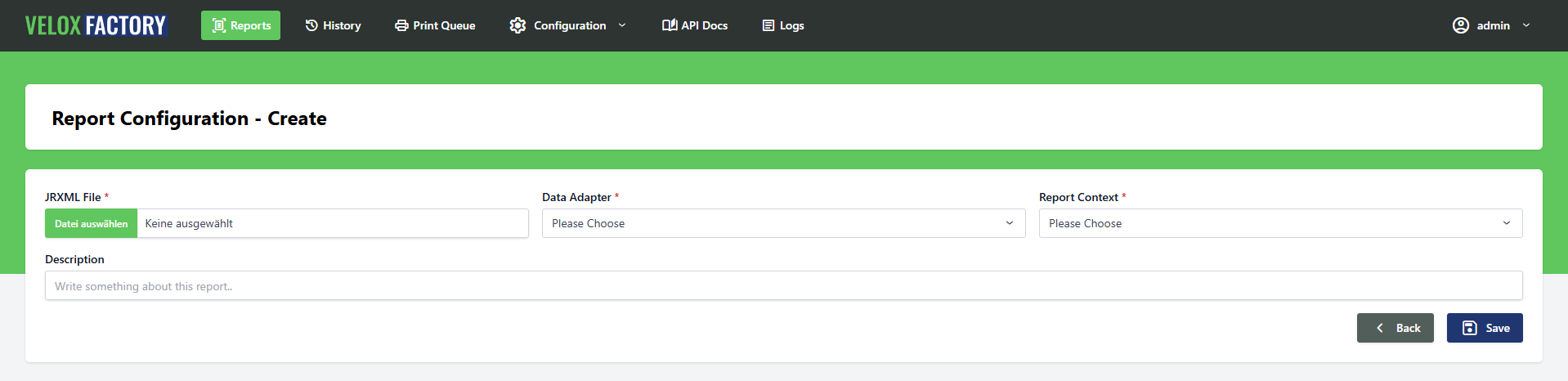
Uploading a Report
When you upload a .jrxml file, VeloxFactory immediately analyses it and builds the initial configuration automatically. The following is extracted from the file:
- Report name — from the
nameattribute on<jasperReport>. Must be unique. - Page dimensions — width and height, converted from Jasper pixels to millimetres.
- Detail band presence — whether the report has a repeating data section.
- Parameters — all non-resource parameters, including their data types and any
exampleValue/requiredcustom properties set in the.jrxml. - Fields — all data fields, including their data types and
exampleValuecustom properties. - Resources — all parameters following the
P_RESOURCE_naming convention (image assets).
The result is a fully structured ReportConfig record with all its child records in place — but not yet complete. Resource files still need to be uploaded, and the SQL query still needs to be written if a live data connection is used.
ReportConfig with the same report name or the same file name already exists.
Completing the Configuration
After upload, the report configuration is ready but not yet fully operational. The following steps complete it:
Upload Resource Files
If the report contains image resources (detected as P_RESOURCE_ parameters), each one requires an actual file to be uploaded. VeloxFactory cannot render the report until all resource files are in place.
Alternatively, a resource can be linked to a CommonReportResource — a shared asset reused across multiple reports, such as a company logo. Linking is permanent: the resource's own file is deleted and the common file is used in its place.
Review Parameters and Fields
VeloxFactory picks up exampleValue and required custom properties from the .jrxml automatically on upload. If these were not set in Jaspersoft Studio, or if you need to adjust them, you can do so directly in the configuration.
Every parameter and field should have an example value set before generating a preview.
Write the SQL Query and Assign a Connection
If the report fetches live data from a database, assign a ReportConnectionConfig and write the SQL query in the Query field. The query is stored in VeloxFactory — not in the .jrxml.
Parameters are available as named bindings in the query (:PARAMETER_NAME). See Creating reports in Jaspersoft Studio for details on how parameter binding works.
A connection is not required if the report has no detail band, or if data will be delivered in the render request itself.
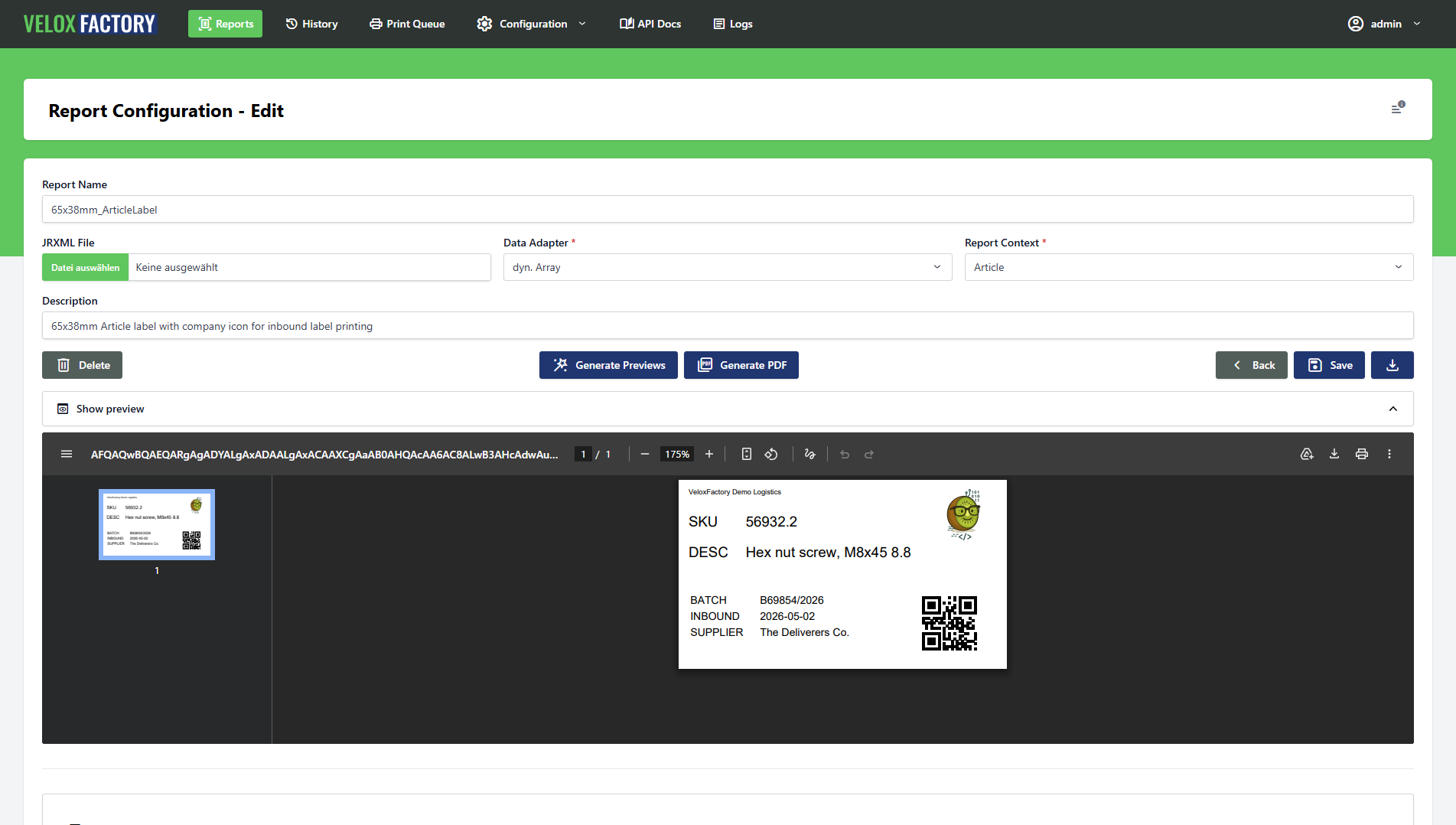
Generating a Preview
Once all resource files are uploaded and all parameters and fields have example values, you can generate a preview. VeloxFactory renders the report using the stored example values — no live data needed — and stores the result as a base64-encoded PDF and a thumbnail image on the ReportConfig.
The preview is used in the report list as a visual card and as a quick sanity check that the template renders correctly. It is also what the useExampleValues flag triggers during a render request — useful for testing without providing real data.
Report History Records
Every render request can optionally create a ReportHistoryRecord — a full log entry of what was requested and what was returned. This is controlled by the createHistoryRecord flag in the render request body and is off by default.
When enabled, the history record captures:
- The exact request payload sent to the render endpoint
- The full API response
- The rendered PDF (Base64-encoded)
- A thumbnail of the first page (generated asynchronously in the background)
- The rendering status (
ok,render_fail,error,unknown) - The trace ID for cross-referencing with logs
History records are valuable for traceability — you can see exactly what was rendered, when, with what data, and what the result was. From a history record, you can also dispatch a reprint directly.
When to Skip History Records
History records are entirely optional. There are two good reasons to leave them off:
Performance and storage. Storing the full PDF, request payload, and response for every render adds up. For high-frequency rendering where traceability is not needed, skipping history records keeps the database lean.
Data sensitivity. A history record stores the complete render payload — including all parameters and data passed to the report. If that data is sensitive (personal data, financial figures, medical information), you may not want it persisted on the server at all. Omitting createHistoryRecord from the render request ensures nothing is logged.
Retention
History records are automatically purged after a configurable number of days. The retention period is set via the PURGE_HISTORY_DAYS environment variable (default: 30 days). Purging runs automatically as a background job — no manual intervention required.

Report Print Tasks
A ReportPrintTask sends a rendered PDF to a physical printer. Print tasks are created as part of a render request — you render and dispatch to a printer in a single call — by setting createPrintTask: true and providing a printerName.
Print tasks are always linked to a ReportHistoryRecord. This means creating a print task also creates a history record (regardless of whether createHistoryRecord is explicitly set), so the printed document is always traceable.
How Printing Works
VeloxFactory does not communicate with printers directly. Instead, it creates a ReportPrintTask record and notifies a separate print service — a lightweight C# application running on or near the target machine — which picks up the task and executes the print job.
There are two modes of delivery:
WebSocket (push). If a broadcastId is included in the render request, VeloxFactory broadcasts a ReportPrintTaskCreated event via WebSocket (Laravel Reverb) the moment the task is created. The print service subscribes to that channel and reacts immediately. This is the recommended mode for real-time printing — the task reaches the printer within milliseconds of the render completing.
Polling (pull). Without a broadcastId, no broadcast is sent. The print service must poll the API for new tasks in pending status. This works fine for less time-sensitive workflows.
Print Task Status
| Status | Meaning |
|---|---|
| pending | Created, waiting for the print service to pick it up |
| printed | Print job executed and confirmed by the print service |
| error | Print service reported a failure |
| unknown | Status could not be determined |
The print service reports status back to VeloxFactory via the API after executing the job. The error_message field on the task record contains the failure detail if printing did not succeed.
Copies
The numberOfCopies field is passed to the print service as the requested number of printed copies. It defaults to 1 if not specified. VeloxFactory always renders the PDF exactly once — the print service is responsible for duplicating the output on the printer side.
PURGE_PRINTTASKS_DAYS days (default: 30). Like history record purging, this runs in the background without any manual action.
Deleting a Report Configuration
A ReportConfig can only be deleted when no ReportHistoryRecord or ReportPrintTask references it. VeloxFactory will reject a deletion request while any such records exist.
When a ReportConfig is deleted, the following is removed along with it: the .jrxml file from disk, all resource files, and all parameter and field records. The deletion is atomic — if any step fails, the entire operation is rolled back.
Data adapters for dyn. data control
Reports that display repeating data — lists, tables, card grids — need a data source. VeloxFactory supports two ways to supply that data at render time: a live SQL connection that queries a database automatically, or a dynamic array delivered directly in the render request. Understanding when to use which approach, and how each one works, is key to getting the most out of VeloxFactory.
Two Approaches, One Result
| SQL Connection | Dynamic Array | |
|---|---|---|
| Data source | Live database, queried at render time | JSON array in the render request body |
| Who fetches the data? | VeloxFactory | The calling application |
| Connection config needed? | Yes | No |
| SQL query needed? | Yes | No |
| Best for | Reports where VeloxFactory has direct DB access | Reports where the caller already has the data |
Both approaches produce the same result: a populated report. The choice depends on where your data lives and who is best placed to retrieve it.
Reports without a detail band — purely static layouts driven by parameters — need neither.
SQL Connections
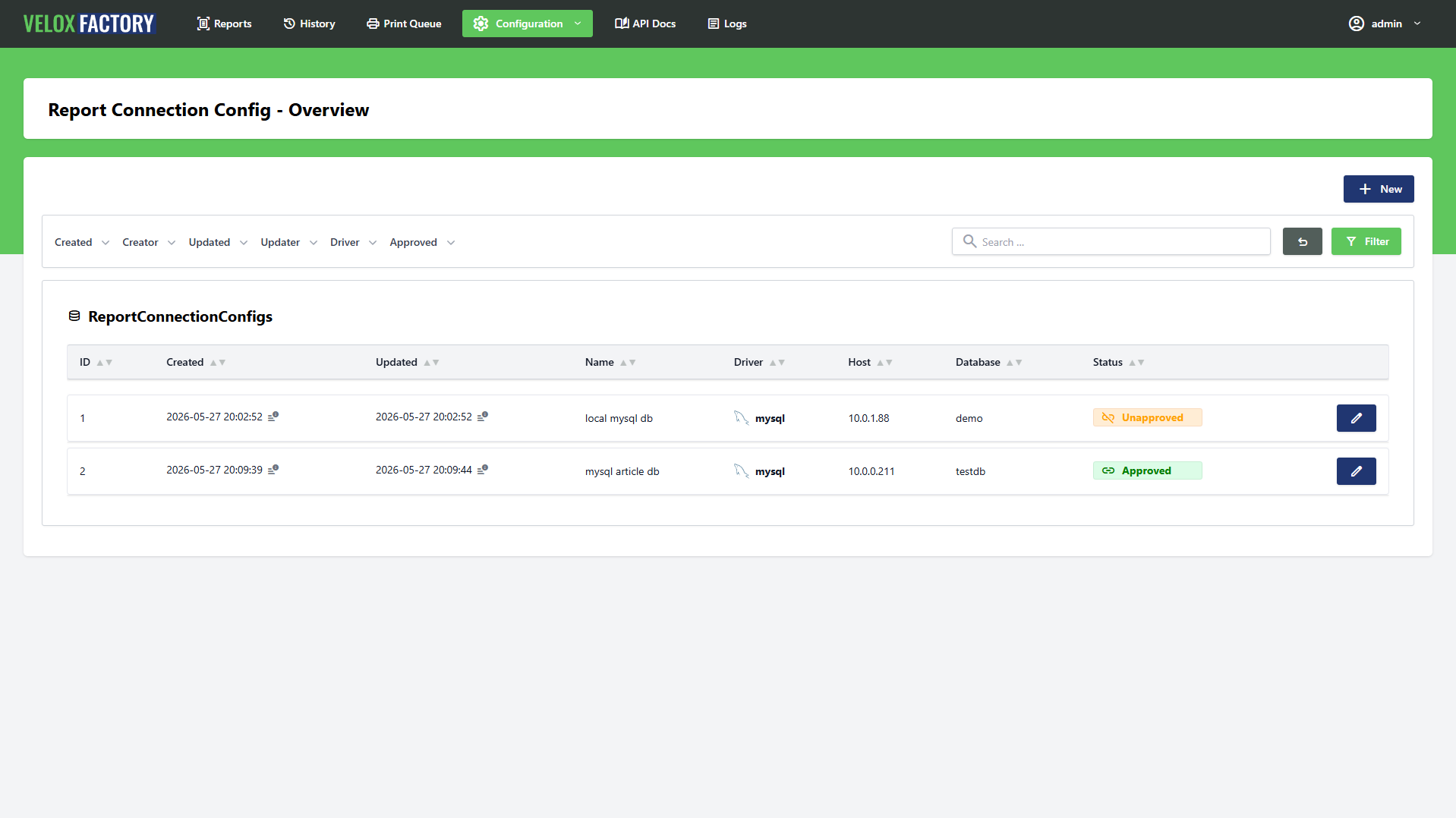
A ReportConnectionConfig defines a live database connection that VeloxFactory uses to fetch data at render time. When assigned to a ReportConfig, VeloxFactory executes the configured SQL query against that connection, takes the result rows, and feeds them as field data into the report.
Setting Up a Connection
A connection config holds the credentials and driver settings for one database. Supported drivers are MySQL, MariaDB, PostgreSQL, and Microsoft SQL Server.
Before a connection can be assigned to a report, it must be tested and approved. VeloxFactory runs a test query against the database to verify connectivity — only connections with a passing test are available in the ReportConfig assignment dropdown.
Writing the SQL Query
The SQL query is written and stored in VeloxFactory — not in the .jrxml. It lives on the ReportConfig record and is executed against the assigned connection at render time.
The query must return columns whose names match exactly the field names defined in the .jrxml. For a report with fields articleNumber, description, and moq, the query must alias its columns accordingly:
SELECT
art_no AS articleNumber,
art_description AS description,
min_order_qty AS moq,
delivery_days AS deliveryTime,
supplier_name AS supplier,
barcode
FROM articles
ORDER BY art_no ASC
Column names are case-sensitive. articleNumber and articlenumber are not the same field.
Using Parameters as SQL Variables
Parameters passed in the render request are available as named bindings in the SQL query using the :PARAMETER_NAME syntax. VeloxFactory scans the query for :name placeholders before execution and binds only the parameters that are actually referenced — extras are silently ignored.
This makes it straightforward to filter, sort, or paginate the result set based on render-time input:
-- Filter by article number
SELECT
art_no AS articleNumber,
art_description AS description,
min_order_qty AS moq
FROM articles
WHERE art_no = :P_ARTICLE_NUMBER
-- Date range filter with two parameters
SELECT
order_id AS orderId,
customer_name AS customerName,
order_date AS orderDate,
total_amount AS totalAmount
FROM orders
WHERE order_date BETWEEN :P_DATE_FROM AND :P_DATE_TO
ORDER BY order_date ASC
-- Wildcard search
SELECT
art_no AS articleNumber,
art_description AS description
FROM articles
WHERE art_description LIKE CONCAT('%', :P_SEARCH_TERM, '%')
The render request for the date range example would look like this:
POST /api/v1/report-config/OrderList/render
{
"outputType": "base64",
"parameters": {
"P_DATE_FROM": "2024-01-01",
"P_DATE_TO": "2024-03-31"
},
"data": [],
"createHistoryRecord": true,
"createPrintTask": false
}
Parameter Promotion from Query Results
There is a powerful pattern worth knowing: if a SQL result column has the same name as a registered parameter on the report, VeloxFactory automatically promotes that value from the data rows into the parameters map — before the report renders.
This means you can derive parameter values directly from the database without having to pass them in the render request. The query does the lookup; the result feeds both the detail band and the header parameters in a single call.
Consider a report that prints a picking list for a warehouse order. The header shows the order number, the customer name, and the warehouse location — all parameters. The detail band shows the individual line items — fields. Normally you would have to fetch the order header separately and pass it as parameters. With parameter promotion, a single query can deliver everything:
-- First row drives the header parameters, all rows drive the detail band.
-- P_ORDER_NUMBER, P_CUSTOMER_NAME, and P_WAREHOUSE match registered parameter
-- names and will be promoted automatically. The remaining columns stay as field data.
SELECT
o.order_number AS P_ORDER_NUMBER,
c.customer_name AS P_CUSTOMER_NAME,
w.location_code AS P_WAREHOUSE,
ol.sku AS sku,
ol.description AS description,
ol.quantity AS quantity,
ol.bin_location AS binLocation
FROM orders o
JOIN customers c ON c.id = o.customer_id
JOIN warehouses w ON w.id = o.warehouse_id
JOIN order_lines ol ON ol.order_id = o.id
WHERE o.order_number = :P_ORDER_NUMBER
ORDER BY ol.bin_location ASC
The render request only needs the order number:
POST /api/v1/report-config/PickingList/render
{
"outputType": "base64",
"parameters": {
"P_ORDER_NUMBER": "ORD-2024-00451"
},
"data": [],
"createHistoryRecord": true,
"createPrintTask": false
}
VeloxFactory executes the query, detects that P_ORDER_NUMBER, P_CUSTOMER_NAME, and P_WAREHOUSE match registered parameter names, moves their values from the first data row into the parameters map, and renders the report with a populated header and a fully populated detail band — all from one query, one request.
Dynamic Array
When no ReportConnectionConfig is assigned, VeloxFactory expects the data to arrive in the render request itself — as a JSON array in the data field. Each object in the array represents one row in the detail band, with keys matching the field names defined in the .jrxml.
This approach is ideal when the calling application already has the data in memory, when the data comes from a source VeloxFactory cannot connect to directly, or when the data structure is too dynamic to express in a fixed SQL query.
A complete render request with inline data looks like this:
POST /api/v1/report-config/A5_KanBan/render
{
"outputType": "base64",
"parameters": {
"P_ARTICLE_NUMBER": "4561287-154"
},
"data": [
{
"articleNumber": "4561287-154",
"description": "Packing Carton Size 1 - 200x150x50mm",
"moq": 250,
"deliveryTime": "3 Days",
"supplier": "Ninghao Packaging",
"barcode": "5698532145712"
}
],
"createHistoryRecord": false,
"createPrintTask": false
}
For reports that print one item per page, the data array typically contains a single object. For list or table reports, it contains one object per row.
.jrxml. A field declared as java.lang.Integer expects a JSON number, not a string. Pass values in their native JSON type — numbers as numbers, booleans as booleans.
Static Reports — No Data Needed
Reports without a detail band require neither a connection config nor a data array. The entire output is driven by parameters alone. Common examples: cover pages, certificates, summary headers, QR code labels, or any document where the layout is fixed and all variable content comes from a handful of input values.
For these reports, the render request simply omits data entirely:
POST /api/v1/report-config/CertificateOfConformity/render
{
"outputType": "url",
"parameters": {
"P_PRODUCT_NAME": "Industrial Bearing 6205-2RS",
"P_BATCH_NUMBER": "BAT-2024-0077",
"P_ISSUE_DATE": "2024-03-15",
"P_INSPECTOR_NAME": "M. Fischer"
},
"createHistoryRecord": true,
"createPrintTask": false
}
Rendering reports in VeloxFactory
Rendering from the frontend
Every report configuration in VeloxFactory has a built-in Generate PDF function — a dedicated page that lets you render the report directly from the browser, without writing a single line of code or touching the API. It is the fastest way to produce a PDF, test a configuration, or trigger a print job on demand.
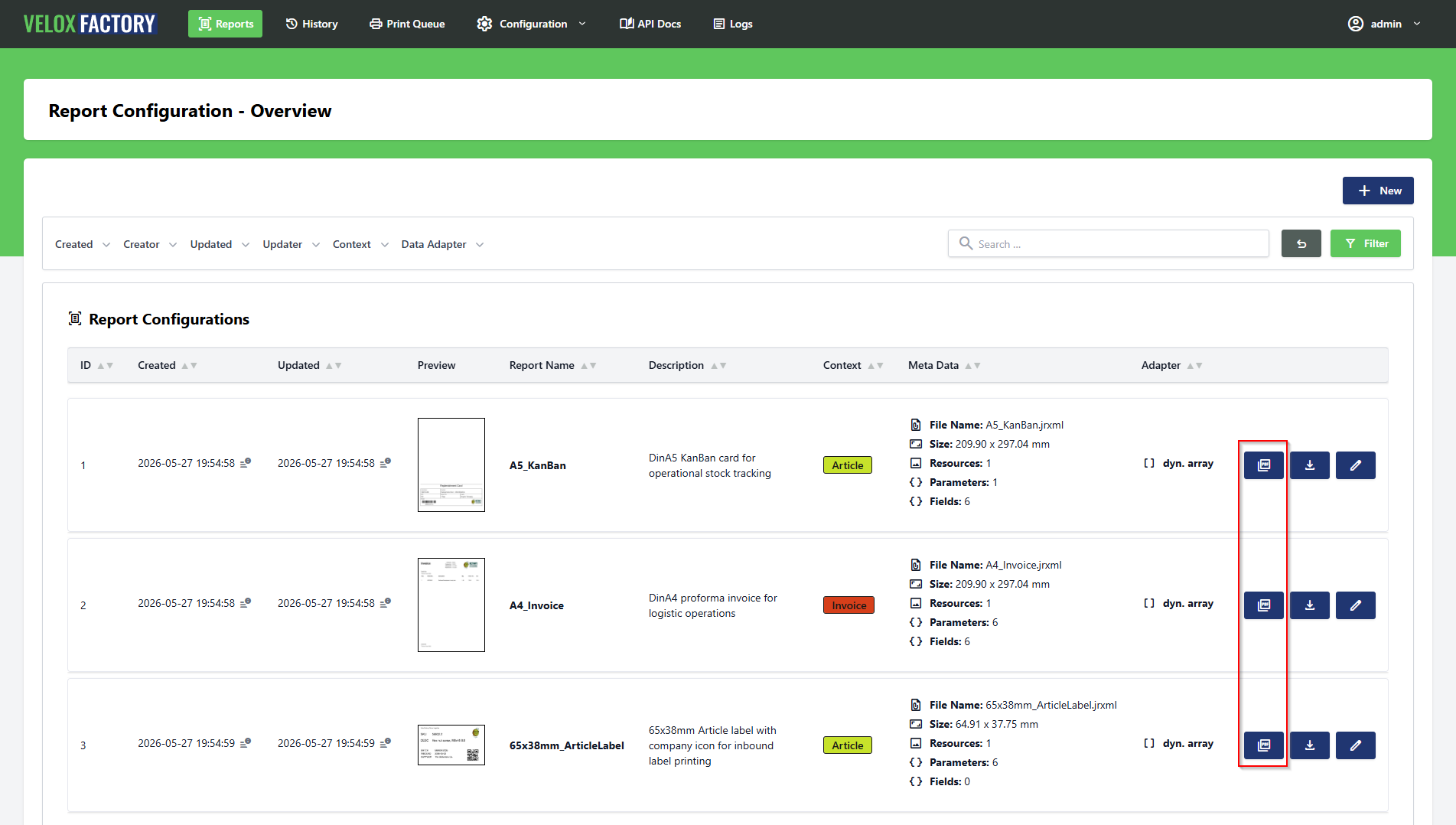
Opening the Generate PDF Page
There are two ways to reach the Generate PDF page. From the report configuration list, each report card has a dedicated Generate PDF button — clicking it takes you directly to the render page without having to open the report first. Alternatively, open any report configuration and navigate to Generate PDF from within the report view.
The page shows two read-only fields at the top — the report name and the active data adapter — so you always know at a glance which report you are working with and where its data comes from.
The data adapter field displays either the name of the assigned ReportConnectionConfig (including driver and database) or dyn. Array if no SQL connection is configured. This directly influences what input sections appear further down the page.
Report Parameters
If the report defines parameters, a parameter input table is shown. Each parameter gets its own typed input field — the input type is derived automatically from the Java class declared in the .jrxml:
- A
java.lang.Stringparameter becomes a text field. - A
java.sql.Dateparameter becomes a date picker. - A
java.lang.Integerparameter becomes a number input with integer constraints. - A
java.lang.Booleanparameter becomes a toggle switch. - And so on for all supported types.
Parameters marked as required in the report configuration must be filled in before the form can be submitted. Optional parameters can be left empty — VeloxFactory silently drops empty parameter values and does not include them in the render request.
Report Lines — Manual Data Entry
The Report Lines section only appears when the report has no SQL connection assigned — i.e. when the data adapter is dyn. Array. In this case, VeloxFactory has no database to query, so the detail band data must be entered manually in the browser.
The section shows a table with one column per field defined in the report. Each cell contains a typed input matching the field's data type. You fill in one row of values per data record you want to appear in the report.
To add more rows, use the Add Row button — it clones the input row and appends a new empty one. Individual rows (except the first) can be removed with the delete button on the right. Empty fields are not transferred to the render request.
Resources
If the report has image resources, a collapsible Resources section is available on the page. It shows a preview thumbnail of each resource file, its parameter name, and its file name. Resources are handled automatically at render time — you do not interact with them during rendering. The section is informational only, confirming which image files are currently assigned.
Generating the PDF
Once parameters and fields are filled in, click Generate PDF. A confirmation modal opens with the rendering options:
| Option | Default | Description |
|---|---|---|
| Create History Record | On | Saves a full record of this rendering — request, response, PDF, and thumbnail — to the report history. |
| Create Print Task | Off | Dispatches the rendered PDF to the print service after rendering. Requires a printer name. |
| Printer Name | — | The target printer. Required when Create Print Task is enabled. |
| Copies | 1 | Number of copies passed to the print service. Does not trigger multiple renders. |
| Broadcast ID | — | Optional WebSocket channel ID. If provided, the print service is notified in real time when the print task is created. Leave empty to rely on polling instead. |
Confirm with Generate to start the render. The request is processed synchronously — the page waits for the result and displays it immediately.
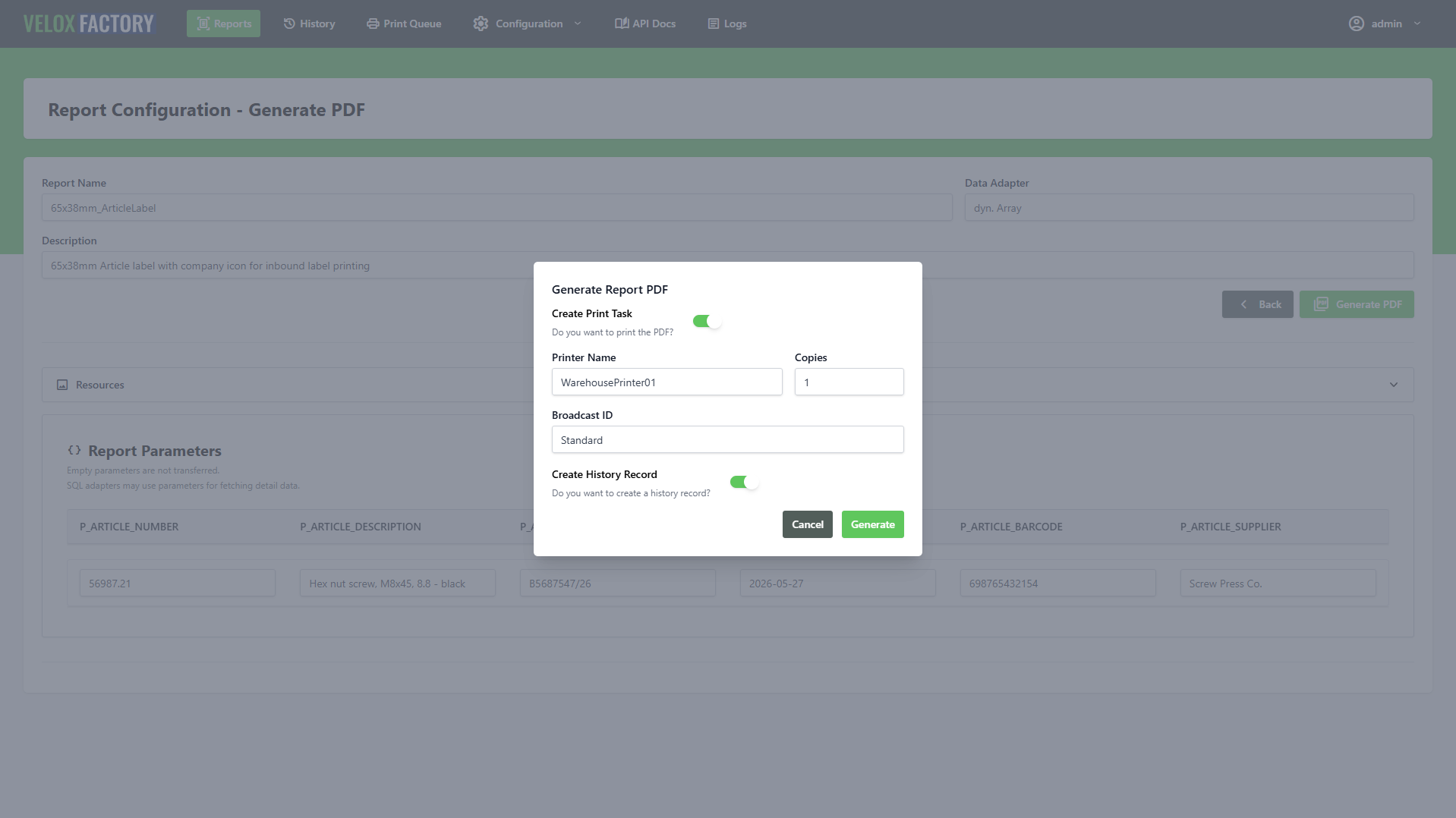
The Result
Success
On a successful render, the page shows a green confirmation banner and embeds the generated PDF as an inline preview directly in the browser — sized to the report's actual page dimensions. No download required; the document is immediately visible.
If a history record was created, a View History button appears — linking directly to the new ReportHistoryRecord. If a print task was dispatched, a View Print Task button appears as well, linking to the ReportPrintTask record where you can monitor its status.
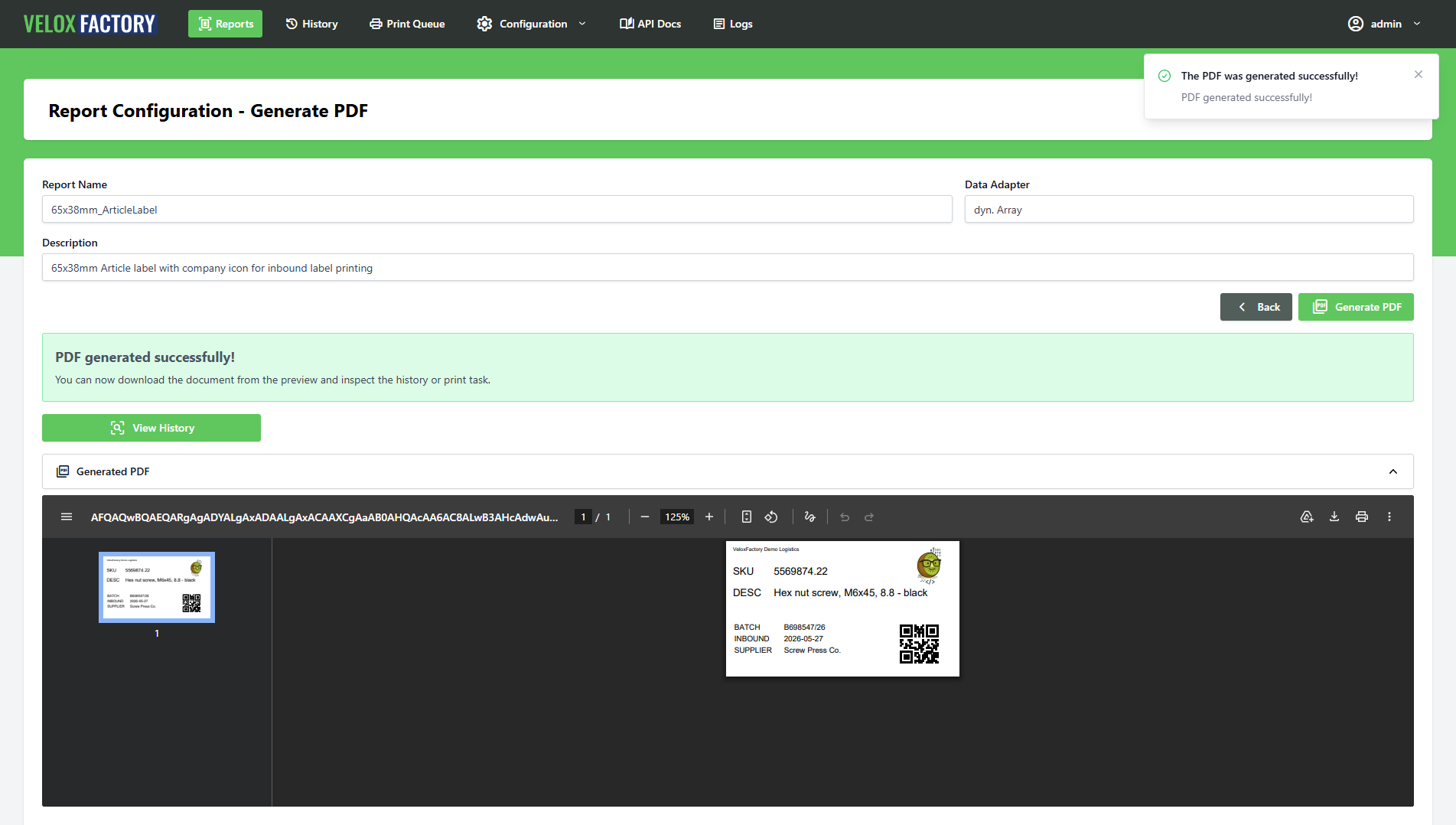
Errors
If the render fails, the page shows a red error banner listing all error messages returned by VeloxFactory. Common causes are missing required parameters, a SQL query that returns no data for a report that expects some, or a resource file that was removed after the configuration was last saved.
If a history record was created before the error occurred, the View History button still appears — the failed attempt is recorded, including the error details, which is useful for diagnosing what went wrong.
Rendering with our powerful API
Everything the Generate PDF page does in the browser, the API does programmatically — with more control, lower overhead, and the same rendering engine underneath. A single POST request renders a report, optionally logs the result, and optionally dispatches a print job, all in one call.
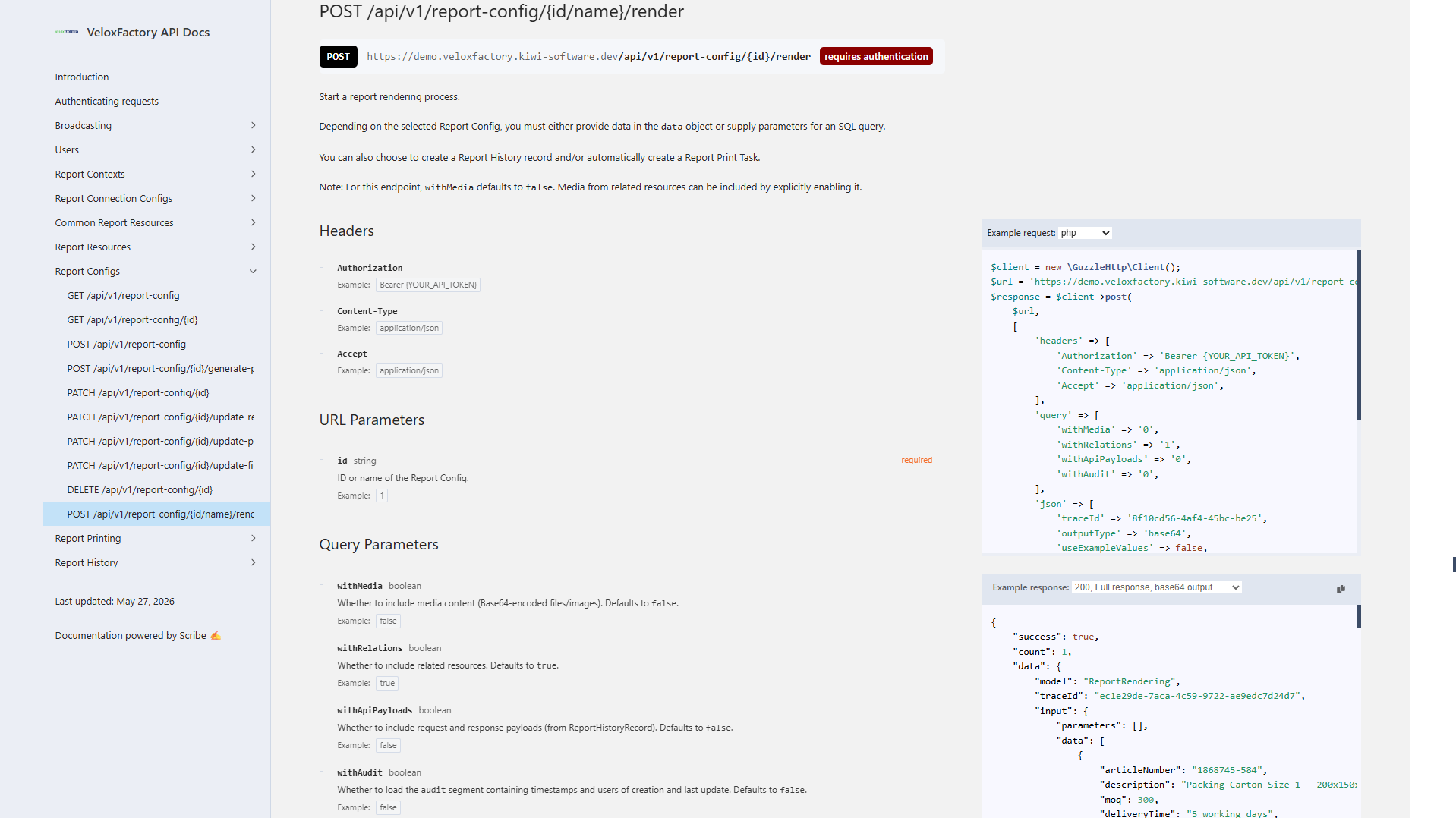
The Render Endpoint
POST /api/v1/report-config/{id}/render
The {id} segment accepts either the numeric ID of the ReportConfig or its report name — the name set in Jaspersoft Studio and stored in VeloxFactory. Both of these are equivalent:
POST /api/v1/report-config/1/render
POST /api/v1/report-config/A5_KanBan/render
Using the report name is convenient for integrations: it stays stable even if the database record is recreated, and it makes the request self-documenting.
Request Body
| Field | Type | Required | Description |
|---|---|---|---|
outputType |
string | ✓ | Output format: base64, url, or none. See below. |
parameters |
object | Key-value map of parameter names to values. Required parameters must be present or the request is rejected. | |
data |
array | Array of field objects — one per detail band row. Each object's keys must match the report's field names. Only needed when no SQL connection is configured. | |
createHistoryRecord |
boolean | ✓ | Whether to create a ReportHistoryRecord for this render. Stores the full request, response, and rendered PDF. |
createPrintTask |
boolean | ✓ | Whether to dispatch the rendered PDF to the print service. |
printerName |
string | if print task | Target printer name. Required when createPrintTask is true. |
numberOfCopies |
integer | Number of copies passed to the print service. Defaults to 1. VeloxFactory always renders once — the print service handles duplication. |
|
broadcastId |
string | WebSocket channel ID. If provided, VeloxFactory broadcasts a ReportPrintTaskCreated event when the print task is created. Omit to rely on polling. |
|
useExampleValues |
boolean | Use the stored example values instead of supplying parameters and data. Useful for testing. API-only — not available in the frontend. See below. |
|
laconicResponse |
boolean | Return only the essential output fields instead of the full response. Reduces payload size significantly for high-frequency rendering. See below. | |
traceId |
string | Custom trace identifier for this request. Auto-generated (UUID) if not provided. Must be unique across all history records if supplied. |
Output Types
The outputType field controls how — or whether — the rendered PDF is returned.
base64 — The PDF is Base64-encoded and returned inline in output.reportPdfBase64. No file is written to disk. This is the most common choice for integrations that process the PDF immediately.
url — The PDF is saved to the VeloxFactory history storage and a URL pointing to that file is returned in output.reportUrl. Useful when the calling application needs to hand off a link rather than handle raw bytes.
none — No PDF data is returned at all. Valid only when createPrintTask is true — the PDF is rendered internally and handed to the print service without being exposed in the response. Use this when the response payload is irrelevant and you only care about getting the document to the printer.
outputType: none requires createPrintTask: true. Requesting output type none without a print task is rejected with a validation error — there would be nothing to do with the rendered PDF.
useExampleValues — API-only Testing Mode
When useExampleValues: true is set, VeloxFactory ignores any parameters and data in the request body and instead uses the example values stored on the ReportConfig. This is the same data used to generate the report preview in the frontend.
It is a convenient way to verify that a report renders correctly after configuration changes — no test data needs to be assembled:
POST /api/v1/report-config/A5_KanBan/render
{
"outputType": "base64",
"useExampleValues": true,
"createHistoryRecord": false,
"createPrintTask": false
}
useExampleValues is an API-only feature. The Generate PDF page in the browser always requires parameters and data to be entered manually. For frontend testing, use the example values from the report configuration edit page.
laconicResponse — Minimal Output
By default, a successful render response includes the full ReportConfig record, the input parameters and data echoed back, and any linked ReportHistoryRecord and ReportPrintTask. For many production integrations, this detail is unnecessary — the caller only needs the PDF.
Setting laconicResponse: true strips the response down to the essentials: just the traceId and the output block. Everything else — input, reportConfig, reportHistoryRecord, reportPrintTask — is omitted.
The two response shapes are shown in detail in the Response Structure section below.
reportMeta in error responses. If a render fails in laconic mode, the error response contains only the error messages — the field and parameter metadata is not included.
A Complete Request
Here is a full render request for a KanBan label — dynamic array data, a parameter, history logging enabled, print task dispatched via WebSocket:
POST /api/v1/report-config/A5_KanBan/render
{
"outputType": "base64",
"parameters": {
"P_ARTICLE_NUMBER": "4561287-154"
},
"data": [
{
"articleNumber": "4561287-154",
"description": "Packing Carton Size 1 - 200x150x50mm",
"moq": 250,
"deliveryTime": "3 Days",
"supplier": "Ninghao Packaging",
"barcode": "5698532145712"
}
],
"createHistoryRecord": true,
"createPrintTask": true,
"printerName": "WarehousePrinter01",
"numberOfCopies": 1,
"broadcastId": "Standard",
"laconicResponse": false
}
Response Structure
Full Response
The full response (default, laconicResponse: false or omitted) includes the rendered output, the echoed input, the full ReportConfig snapshot, and any created ReportHistoryRecord and ReportPrintTask:
{
"success": true,
"count": 1,
"data": {
"model": "ReportRendering",
"traceId": "ec1e29de-7aca-4c59-9722-ae9edc7d24d7",
"input": {
"parameters": { "P_ARTICLE_NUMBER": "4561287-154" },
"data": [
{
"articleNumber": "4561287-154",
"description": "Packing Carton Size 1 - 200x150x50mm",
"moq": 250,
"deliveryTime": "3 Days",
"supplier": "Ninghao Packaging",
"barcode": "5698532145712"
}
]
},
"output": {
"reportPdfFileName": "a7dd0ea5-85fd-481c-998b-fa9819c2e84c.pdf",
"reportPdfBase64": "JVBERi0xLjQ..."
},
"reportConfig": {
"model": "ReportConfig",
"id": 1,
"name": "A5_KanBan",
...
},
"reportHistoryRecord": {
"model": "ReportHistoryRecord",
"id": 4,
"traceId": "ec1e29de-7aca-4c59-9722-ae9edc7d24d7",
"outputType": "Base64",
"status": "Ok"
},
"reportPrintTask": {
"model": "ReportPrintTask",
"id": 4,
"traceId": "ec1e29de-7aca-4c59-9722-ae9edc7d24d7",
"broadcastId": "Standard",
"printerName": "WarehousePrinter01",
"numberOfCopies": 1,
"status": "Pending",
"errorMessage": null
}
},
"meta": [],
"status": 200
}
Laconic Response
With laconicResponse: true, the response contains only what is needed to retrieve the PDF:
{
"success": true,
"count": 1,
"data": {
"model": "ReportRendering",
"traceId": "555d073b-a630-4096-acd1-643b85ed5cc9",
"output": {
"reportPdfFileName": "8de016b5-4cf9-423a-9575-8c3155e35410.pdf",
"reportPdfBase64": "JVBERi0xLjQ..."
}
},
"meta": [],
"status": 200
}
The traceId is always included — it links this render to any created history record or print task, making it useful for cross-referencing even in laconic mode.
Errors
Validation Errors — HTTP 422
Missing required fields, an invalid outputType value, or a missing printerName when a print task is requested all produce a 422 response with an errors array describing the violations.
Required parameters that are not present in the request also return a 422 — one error message per missing parameter:
{
"success": false,
"errors": [
"Parameter P_DATE_FROM is required.",
"Parameter P_DATE_TO is required."
],
"meta": { "traceId": "..." },
"status": 422
}
Render Errors — HTTP 400
If the request passes validation but the renderer itself fails — empty data array for a report with a detail band, a type mismatch between field values and declared Java types, a broken SQL query — the response comes back with HTTP 400 and a success: false payload.
In full (non-laconic) mode, a reportMeta block is included in the meta object alongside the traceId. This snapshot lists the report's fields, parameters, and resources at the time of the failure — useful for diagnosing mismatches between the request payload and what the report actually expects:
{
"success": false,
"errors": [
"No data delivered (or fetched via SQL using parameters) while data deliverance is mandatory for reports with detail bands."
],
"meta": {
"traceId": "08deac82-274d-4f56-b9d0-d9fdb6280f8f",
"reportMeta": {
"resourceList": [
{ "parameterName": "P_RESOURCE_LOGO", "fileName": "Logo_Dark.png" }
],
"parameterList": [
{ "parameterName": "P_ARTICLE_NUMBER", "dataType": "java.lang.String" }
],
"fieldList": [
{ "fieldName": "articleNumber", "dataType": "java.lang.String" },
{ "fieldName": "description", "dataType": "java.lang.String" },
{ "fieldName": "moq", "dataType": "java.lang.Integer" },
{ "fieldName": "deliveryTime", "dataType": "java.lang.String" },
{ "fieldName": "supplier", "dataType": "java.lang.String" },
{ "fieldName": "barcode", "dataType": "java.lang.String" }
]
}
},
"status": 400
}
If a ReportHistoryRecord was requested (createHistoryRecord: true), it is still created even when the render fails — the error is recorded in the history entry, which makes it possible to review failed renders from the frontend alongside successful ones.
The concept of Report History Records
Every render request tells VeloxFactory what to produce. A ReportHistoryRecord remembers exactly what was asked for, what came back, and what the result looked like — permanently, until you decide otherwise. It is the foundation for traceability, debugging, and on-demand reprinting in VeloxFactory.
What Gets Stored
A ReportHistoryRecord is created at render time when createHistoryRecord: true is set in the request — or automatically when a print task is dispatched. It captures a complete snapshot of the rendering event:
| Field | Description |
|---|---|
traceId |
Unique identifier shared across the render request, the history record, and any linked print task. Used to correlate events in logs and across systems. |
reportConfig |
Reference to the ReportConfig that was rendered. |
outputType |
The output type used: base64, url, or none. |
apiPayload |
The complete render request body — parameters, data, flags, everything sent to the render endpoint. Stored as JSON. |
apiResponse |
The complete API response returned by VeloxFactory — including any errors. Stored as JSON. |
reportPdf |
The rendered PDF, Base64-encoded. Present on successful renders; null on failure. |
reportPdfFileName |
The UUID-based filename assigned to the rendered PDF. |
reportThumbnail |
A thumbnail image of the first page of the rendered PDF. Generated asynchronously in the background after the record is created. |
status |
Automatically calculated from the stored response. See below. |
Status
The status of a ReportHistoryRecord is calculated automatically every time the record is saved, based on the content of the stored API response:
| Status | Meaning |
|---|---|
| Ok | No errors in the response and a PDF was produced. The render completed successfully. |
| Error | The response contains one or more errors. The render failed — the error messages are stored in the API response payload. |
| Render Fail | No errors in the response, but no PDF was produced either. An edge case indicating something unexpected occurred during rendering. |
| Unknown | Status could not be determined from the stored response. |
History records are created for both successful and failed renders. A failed render still produces a complete record — including the error messages — which is often more useful than a successful one when something goes wrong.
The Thumbnail
When a history record is created, VeloxFactory dispatches a background job that converts the first page of the rendered PDF into a thumbnail image using pdftoppm (part of poppler-utils). The thumbnail is stored on the record and displayed in the history list and the report card grid — giving you an immediate visual of what was produced without opening the PDF.
Traceability and Debugging
The most valuable aspect of a history record is not the PDF — it is the payload. Every record stores the exact request that triggered the render and the exact response that came back. This means you can answer the following questions at any point in the future, without touching the calling application:
- What parameters were passed to this render?
- What data was submitted?
- Was the render triggered via the frontend or the API?
- What did VeloxFactory return — and did it succeed?
- If it failed, what was the exact error message?
The traceId ties everything together. It is present on the history record, on any linked print task, and in the server logs. When something goes wrong in production and you have a traceId, you can pull the history record and reconstruct the entire event in seconds.
Reprinting from a History Record
A successful history record holds the rendered PDF. That PDF can be dispatched to a printer at any time — without re-rendering the report — using the dedicated print endpoint:
POST /api/v1/report-history-record/{id}/print
{
"printerName": "WarehousePrinter01",
"numberOfCopies": 1
}
VeloxFactory creates a new ReportPrintTask from the stored PDF, assigns it a derived trace ID (the original trace ID with a short random suffix), and dispatches it to the print service. The original history record is linked to the new print task.
This is useful in several scenarios: a print job failed and needs to be retried, a physical document was lost and needs to be reprinted, or a record needs to be dispatched to a different printer than the one originally used.
This endpoint is also available directly from the frontend — the history record detail view has a Print button that opens a modal to enter the printer name and number of copies.
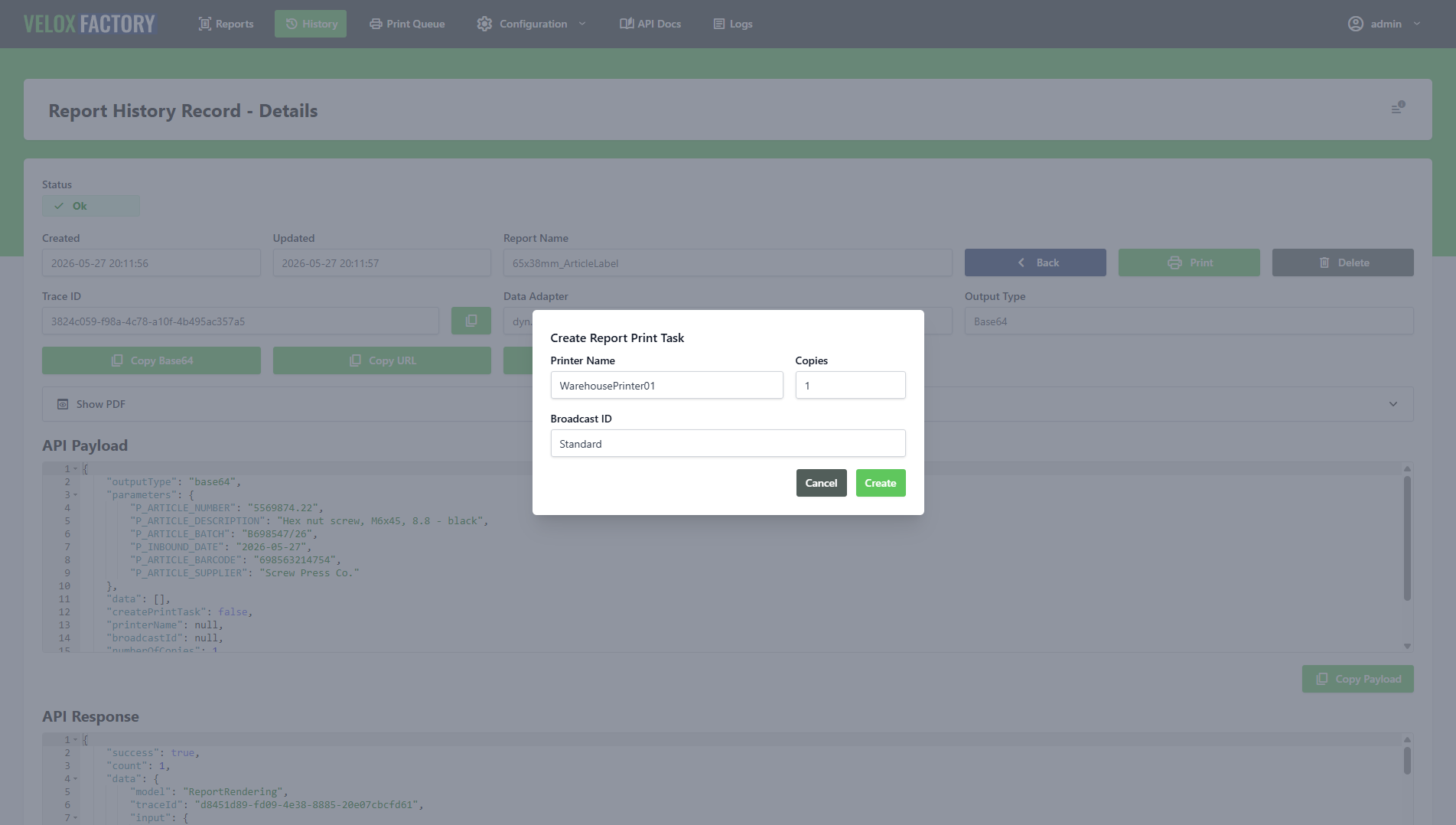
Retention and Deletion
Automatic Purging
History records are automatically purged after a configurable number of days. The retention period is set via the PURGE_HISTORY_DAYS environment variable (default: 30 days). Purging runs as a scheduled background job — no manual intervention required.
Deletion Constraints
A ReportHistoryRecord cannot be deleted while any ReportPrintTask still references it. The linked print tasks must be removed first. VeloxFactory provides a dedicated endpoint for this:
DELETE /api/v1/report-history-record/{id}/delete-all-report-print-tasks
This removes all print tasks associated with the record in one call, after which the history record itself can be deleted.
Impact on ReportConfig Deletion
A ReportConfig cannot be deleted while any history records reference it. This is a deliberate constraint: the history exists as a permanent trace of what was rendered using that configuration. To remove a report configuration entirely, its history records — and their linked print tasks — must be cleared first, either manually or by waiting for the automatic purge to run.
Print your renderings
Creating Report Print Tasks
A ReportPrintTask represents a single print job — a PDF queued for delivery to a physical printer. VeloxFactory does not communicate with printers directly. Instead, it creates the task record, optionally notifies a separate print service via WebSocket, and waits for the service to report back. This page covers how tasks are created, how the status lifecycle works, and how to handle retries.
Three Ways to Create a Print Task
1. As Part of a Render Request
The most common path: set createPrintTask: true in the render request body, provide a printerName, and VeloxFactory renders the report and dispatches it to the printer in a single call. No second request needed.
POST /api/v1/report-config/A5_KanBan/render
{
"outputType": "base64",
"parameters": { "P_ARTICLE_NUMBER": "4561287-154" },
"data": [ { ... } ],
"createHistoryRecord": true,
"createPrintTask": true,
"printerName": "WarehousePrinter01",
"numberOfCopies": 1,
"broadcastId": "Standard"
}
2. From a History Record
A task can be dispatched from any existing ReportHistoryRecord — without re-rendering the report. VeloxFactory uses the PDF stored in the history record and creates a new print task from it:
POST /api/v1/report-history-record/{id}/print
{
"printerName": "WarehousePrinter01",
"numberOfCopies": 2
}
This is the standard reprint path. See The concept of Report History Records for details.
3. Standalone via the Print Task API
Print tasks can also be created directly — independently of any render or history record. The POST /api/v1/report-print-task endpoint accepts any PDF as a Base64 string, making it possible to use the VeloxFactory print infrastructure for documents that were not produced by VeloxFactory at all.
POST /api/v1/report-print-task
{
"fileName": "delivery_note_5521.pdf",
"fileBase64": "JVBERi0xLjQ...",
"printerName": "WarehousePrinter01",
"numberOfCopies": 1,
"broadcastId": "Standard"
}
reportConfig and reportHistoryRecord are both optional on this endpoint — the task is created without either relation if they are not provided.
The Data Model
| Field | Description |
|---|---|
traceId |
Unique identifier. Shared with the linked history record when the task was created via a render request. For reprints, a derived trace ID is generated (original + short random suffix). |
reportConfig |
The ReportConfig the printed PDF was generated from. Optional — not present for standalone tasks. |
reportHistoryRecord |
The linked ReportHistoryRecord. Optional — not present for standalone tasks. |
printerName |
The name of the target printer, as the print service expects it. |
numberOfCopies |
Number of copies passed to the print service. VeloxFactory always renders once — the print service is responsible for duplication. Defaults to 1. |
broadcastId |
WebSocket channel ID. If set at creation time, VeloxFactory broadcasts a ReportPrintTaskCreated event via Laravel Reverb. Omit to use polling instead. |
outputFileName |
The filename of the PDF queued for printing. |
status |
Current state of the task. See below. |
errorMessage |
Failure detail reported by the print service. null unless status is error. |
Status Lifecycle
Every print task starts as pending. The print service picks it up, executes the job, and reports the result back to VeloxFactory via the API:
| Status | Set by | Meaning |
|---|---|---|
| pending | VeloxFactory | Task created, waiting for the print service to pick it up. |
| printed | Print service | Print job executed and confirmed. |
| error | Print service | Print job failed. errorMessage contains the failure detail. |
| unknown | — | Status could not be determined. |
The print service reports back using the dedicated status endpoint:
PATCH /api/v1/report-print-task/{id}/set-status
{
"status": "error",
"errorMessage": "Printer offline"
}
Resetting to Pending
A task can be reset to pending using the set-printed shortcut endpoint — setting the status flag to false:
PATCH /api/v1/report-print-task/{id}/set-printed/false
This re-queues the task. If the task has a broadcastId, VeloxFactory re-broadcasts the ReportPrintTaskCreated event immediately — notifying the print service to pick the task up again without polling. This is the standard retry mechanism for failed or stalled print jobs.
WebSocket vs. Polling
How the print service learns about a new task depends on whether a broadcastId is set.
With broadcastId — VeloxFactory broadcasts a ReportPrintTaskCreated event via WebSocket (Laravel Reverb) the moment the task is created. The print service subscribes to the channel identified by broadcastId and reacts immediately. This is the recommended mode for real-time printing — the task reaches the printer within milliseconds of the render completing.
Without broadcastId — No broadcast is sent. The print service must poll GET /api/v1/report-print-task?status=pending at a regular interval and process any tasks it finds. This works fine for workflows where sub-second delivery is not required.
php artisan reverb:start program entry. See Installing VeloxFactory for a reference configuration.
Retention and Deletion
Print tasks are automatically purged after a configurable number of days, set via the PURGE_PRINTTASKS_DAYS environment variable (default: 30 days). Purging runs as a scheduled background job — no manual action required.
Individual tasks can also be deleted directly via the API at any time:
DELETE /api/v1/report-print-task/{id}
There are no deletion constraints on print tasks themselves — they can always be removed. However, deleting a print task is a prerequisite for deleting the linked ReportHistoryRecord, which in turn must be cleared before a ReportConfig can be deleted. Automatic purging handles this chain in the background once retention periods expire.
Our own C#-based print service
VeloxFactory does not talk to printers directly. Instead, a lightweight companion application — the Background Printing Service — runs on any Windows machine that has the target printers installed. It receives print tasks from VeloxFactory, renders the PDF to the printer, and reports the result back. The two components communicate exclusively over the VeloxFactory API and WebSocket; there is no shared database or filesystem.
How it works
The service starts as a regular Windows console process and works through two sequential phases.
Phase 1 — Initial pull
On startup the service immediately calls GET /api/v1/report-print-task?status=pending and processes all tasks it finds. It repeats this in a loop — waiting two seconds between rounds — until the queue comes back empty and no jobs are still running. This ensures that any tasks queued while the service was offline are handled before switching to real-time mode.
Phase 2 — WebSocket listener
Once the initial queue is drained, the service connects to VeloxFactory's WebSocket endpoint (Laravel Reverb) and subscribes to the private channel private-report-print-tasks. From this point on, it reacts to incoming events in real time. If the WebSocket connection drops for any reason, the service waits five seconds and reconnects automatically — no manual restart required.
POST /api/v1/broadcasting/auth and subscribes to the private channel using the configured API token.
Processing a print task
Whether a task arrives via the initial pull or via a WebSocket event, the processing steps are identical:
- Fetch — The service calls
GET /api/v1/report-print-task/{id}to retrieve the full task record, including the PDF as a Base64 string. - Write temp file — The PDF is decoded and written to a temporary file in
reportPdfFileTempPath(e.g.C:\VeloxFactory\temp\42_delivery_note.pdf). - Print — PdfiumViewer opens the PDF and sends it to the printer specified in
printerName. The print is repeatednumberOfCopiestimes. - Report back — On success, the service calls
PATCH /api/v1/report-print-task/{id}/set-printed, which sets the status toprinted. On failure, it callsPATCH /api/v1/report-print-task/{id}/set-statuswith{"status": "error", "errorMessage": "..."}. - Cleanup — The temporary file is deleted regardless of the outcome.
broadcastId — not the PDF. The service always fetches the full task from the API as a second step. This means the printer machine needs HTTP access to VeloxFactory, not just WebSocket access.
Broadcast ID filtering
listeningBroadcastIds is a list of broadcast channel identifiers the service will accept. Any report-print-task.created event whose broadcastId is not in this list is silently ignored.
This makes it straightforward to run multiple service instances in parallel — for example one per location or printer group — each configured to respond only to its own broadcastId. The initial pull is not filtered this way: it always processes all pending tasks returned by the API, regardless of broadcastId.
Configuration
All settings live in App.config in the applicationSettings section. Edit the file in a text editor and restart the service for changes to take effect.
| Setting | Description | Example |
|---|---|---|
apiToken |
Bearer token used for all API requests. Must belong to a user with report-print-task:read, :update, and :delete permissions. |
4|abc123... |
websocketUrl |
WebSocket endpoint of Laravel Reverb. | ws://10.0.0.10:8080/app/veloxfactory |
websocketAuthUrl |
VeloxFactory broadcasting auth endpoint. | http://10.0.0.10:8088/api/v1/broadcasting/auth |
reportPrintTask_index |
URL for the initial pull — must include ?status=pending. |
http://10.0.0.10:8088/api/v1/report-print-task?status=pending |
reportPrintTask_get |
URL template for fetching a single task. {0} is replaced with the task ID. |
http://10.0.0.10:8088/api/v1/report-print-task/{0} |
reportPrintTask_setPrinted |
URL template for marking a task as printed. {0} is replaced with the task ID. |
http://10.0.0.10:8088/api/v1/report-print-task/{0}/set-printed |
reportPrintTask_setError |
URL template for reporting a failed task. {0} is replaced with the task ID. |
http://10.0.0.10:8088/api/v1/report-print-task/{0}/set-status |
listeningBroadcastIds |
List of broadcast IDs this instance will accept. Add one <string> entry per ID. |
Standard, Warehouse |
maxParallelPrintJobs |
Maximum number of tasks processed concurrently. Default: 10. |
10 |
reportPdfFileTempPath |
Directory for temporary PDF files. Created automatically on startup if it does not exist. | C:\VeloxFactory\temp |
logFile |
Path to the log file. Relative paths are resolved from the executable directory. | .\Log.log |
laconicLogging |
If True, only errors are logged. If False, all informational messages are logged as well. |
False |
Concurrency
The service uses two layers of concurrency control to avoid overloading printers.
A global semaphore limits the total number of tasks being processed at the same time to maxParallelPrintJobs. In addition, a per-printer semaphore ensures that only one print job runs on a given printer at a time — jobs targeting different printers can execute in parallel, but two jobs targeting the same printer are always serialised. This prevents the spooler from receiving multiple jobs simultaneously from the service.
Logging
The service uses Serilog and writes to both the console and a rolling log file. Log files are capped at 100 MB each; up to 10 rotated files are retained before the oldest is deleted.
Set laconicLogging to True in App.config to suppress informational messages and log only errors — useful in production once the service is confirmed working.
Dependencies
| Package | Purpose |
|---|---|
PdfiumViewer |
PDF rendering and printing. Wraps the native PDFium library (bundled via PdfiumViewer.Native.x86_64.v8-xfa) — no separate PDF reader installation required on the target machine. |
RestSharp |
HTTP client for all API calls to VeloxFactory. |
Newtonsoft.Json |
JSON serialisation and deserialisation (API responses, WebSocket messages). |
Serilog |
Structured logging to console and rolling file. |
Case studies
Article Label Printing at Scale
Overview
A trading company with its own in-house logistics operation needed a fast, reliable way to generate article labels directly from their ERP data. Manual label creation had become a bottleneck as order volumes grew, and the team was looking for a solution that would integrate cleanly with their existing infrastructure without adding complexity.
Together with kiwi software, they rolled out VeloxFactory as the rendering engine behind a lean scanning workflow that now produces over 4,000 labels per day, fully automated and delivered straight to the warehouse floor.
The Challenge
Warehouse staff had been looking up article data manually, copying it into label templates, and printing. As the business grew, this process couldn't keep up. What they needed was simple:
- Labels generated in under a second per scan
- Data pulled directly from the ERP, no manual input
- An interface that works with a standard barcode scanner, no keyboard required
- No additional middleware, no fat clients, no complex integrations
The Solution
kiwi software built a lightweight single-page scanning mask that ties directly into VeloxFactory's REST API. The whole frontend was finished in a single day. The workflow is straightforward:
- A warehouse employee scans an article barcode
- The scanning mask sends one API request to VeloxFactory, passing only the article number
- VeloxFactory fetches all relevant article data in real time from the connected MS SQL database
- The Jaspersoft report template is rendered with the live data and output as a print-ready PDF
- VeloxFactory dispatches the label to the company's print server, which routes it to the nearest floor printer
Scan in, label out. Typically within 800 ms end-to-end.
Technical Setup
| Component | Details |
|---|---|
| Frontend | Custom scanning mask (developed by kiwi software) |
| Report engine | VeloxFactory |
| Report template | Jaspersoft Studio (.jrxml), designed to label specs |
| Data source | MS SQL Server via VeloxFactory data adapter (sqlsrv driver) |
| API input | Article number only |
| Print delivery | VeloxFactory Print Task to on-premises print server |
| Daily volume | 4,000+ labels |
The data adapter resolves the article number into the full set of label attributes: description, unit, weight class, hazard indicators and storage zone. The report template then lays these out according to the company's label specification.
Results
Since going live, the process runs without any manual intervention:
- 4,000+ labels generated and printed per day, fully automated
- Label generation time down from several minutes to under one second
- Data entry errors eliminated completely
- Staff need no training beyond a single walkthrough of the scanning mask
- No local print drivers or client software required on scanning stations
Why VeloxFactory
The combination of a clean REST API, native data adapter support and built-in print server integration meant there was no need for a separate middleware layer or custom rendering pipeline. kiwi software connected the MS SQL database via the sqlsrv driver, configured the print server target and had the scanning frontend running in a day.
"We connected the database, set up the print target and had a working frontend the same day." -- kiwi software, project lead
Bill of Materials Generation
Overview
A manufacturing company needed a simple, reliable way to get printed bills of materials into the hands of their foremen at the start of each production run. Their existing process involved exporting data manually from their production system, which was slow and prone to errors when order volumes picked up.
By connecting VeloxFactory to their MySQL production database, they now generate 200 to 300 bills of materials per day, each one triggered with nothing more than a production order reference number.
The Challenge
Before VeloxFactory, generating a bill of materials meant pulling data out of the production system by hand, formatting it and sending it to print. The foreman often had to wait, and mistakes in the data transfer occasionally caused issues on the shop floor. The company needed:
- A fast way to generate accurate, print-ready BOMs from live production data
- A process simple enough for office staff to use without training
- No dependency on exports or manual data handling
The Solution
kiwi software connected VeloxFactory to the company's MySQL production database using a configured data adapter. Staff now use VeloxFactory's built-in web frontend to trigger BOM generation: they type in the reference number of a production order, VeloxFactory fetches the full set of production data from the database and renders a structured bill of materials as a PDF. The document is printed and handed to the foreman before the run starts.
No exports, no formatting, no waiting.
Technical Setup
| Component | Details |
|---|---|
| Frontend | VeloxFactory web frontend (built-in) |
| Report engine | VeloxFactory |
| Report template | Jaspersoft Studio (.jrxml) |
| Data source | MySQL database via VeloxFactory data adapter |
| API input | Production order reference number |
| Output | Print-ready PDF bill of materials |
| Daily volume | 200 to 300 BOMs |
The data adapter resolves the production order reference into the full component list, quantities, units and any production notes required for the BOM layout.
Results
Since the rollout, BOM generation is no longer a bottleneck before production starts:
- 200 to 300 bills of materials generated per day
- Generation time reduced from several minutes to seconds
- No more manual data exports or formatting steps
- Foremen receive accurate, consistently formatted documents every time
Why VeloxFactory
VeloxFactory's built-in web frontend meant no custom tooling was needed at all on the user side. kiwi software set up the MySQL data adapter and the Jaspersoft report template, and the company was up and running within a day. The foremen now get a clean, standardised BOM for every production order without anyone having to touch the underlying data.
"Our foremen get the BOM before the run starts. That used to take minutes, now it takes seconds." -- Production manager
Administration
Background Job Processing
VeloxFactory processes background work — thumbnail generation, nightly purge routines, print task cleanup — through a Redis-backed queue managed by Laravel Horizon. Horizon runs as a single supervised process and manages its own worker pool internally. It replaces the simple queue:work approach with dynamic scaling, real-time monitoring, and a built-in dashboard.
Prerequisites
Horizon has two hard requirements beyond the base VeloxFactory stack: a running Redis instance and the php-redis PHP extension. Neither is optional — Horizon will refuse to start without both.
Redis
Redis can be installed natively or run as a Docker container. Both work equally well; the choice depends on your infrastructure preferences.
Native installation:
apt install redis-server
systemctl enable redis-server
systemctl start redis-server
Docker container:
docker run -d \
--name redis \
--restart unless-stopped \
-p 127.0.0.1:6379:6379 \
redis:alpine
The container binds to 127.0.0.1 only — Redis is not exposed to the network, which is the correct default for a single-server deployment.
Whichever method you choose, verify connectivity before proceeding:
redis-cli ping
# Expected: PONG
PHP Redis Extension
VeloxFactory is configured to use phpredis as the Redis client. The extension must be installed and active for PHP:
apt install php-redis
systemctl restart php8.2-fpm # adjust version to match your PHP installation
Confirm the extension is loaded:
php -m | grep redis
# Expected: redis
.env Configuration
With Redis running and the extension installed, update your .env to activate Redis as the queue driver:
QUEUE_CONNECTION=redis
REDIS_CLIENT=phpredis
REDIS_HOST=127.0.0.1
REDIS_PASSWORD=null
REDIS_PORT=6379
Web Server
VeloxFactory requires a web server that routes all requests through Laravel's public/index.php entry point. Both Apache2 and nginx are supported. The Horizon dashboard at /horizon and the Reverb WebSocket endpoint require no special routing rules — they are handled by Laravel and PHP-FPM like any other request, with one exception: Reverb needs a WebSocket proxy pass.
Apache2
Enable mod_rewrite before configuring the vhost:
a2enmod rewrite proxy proxy_http proxy_wstunnel
systemctl restart apache2
Virtual host configuration:
<VirtualHost *:80>
ServerName veloxfactory.example.com
DocumentRoot /var/www/veloxfactory/public
<Directory /var/www/veloxfactory/public>
Options -Indexes +FollowSymLinks
AllowOverride All
Require all granted
</Directory>
# Reverb WebSocket proxy
ProxyPreserveHost On
ProxyPass /app ws://127.0.0.1:8080/app
ProxyPassReverse /app ws://127.0.0.1:8080/app
ErrorLog ${APACHE_LOG_DIR}/veloxfactory-error.log
CustomLog ${APACHE_LOG_DIR}/veloxfactory-access.log combined
</VirtualHost>
Laravel's bundled .htaccess in public/ handles the rewrite rules — no additional configuration needed for URL routing.
nginx
server {
listen 80;
server_name veloxfactory.example.com;
root /var/www/veloxfactory/public;
index index.php;
# Laravel URL routing
location / {
try_files $uri $uri/ /index.php?$query_string;
}
# PHP-FPM
location ~ \.php$ {
fastcgi_pass unix:/var/run/php/php8.2-fpm.sock;
fastcgi_index index.php;
fastcgi_param SCRIPT_FILENAME $realpath_root$fastcgi_script_name;
include fastcgi_params;
fastcgi_read_timeout 120;
}
# Reverb WebSocket proxy
location /app {
proxy_pass http://127.0.0.1:8080;
proxy_http_version 1.1;
proxy_set_header Upgrade $http_upgrade;
proxy_set_header Connection "Upgrade";
proxy_set_header Host $host;
}
# Block dotfile access
location ~ /\.(?!well-known).* {
deny all;
}
}
/var/run/php/php8.2-fpm.sock. Verify with ls /var/run/php/.
Queues
VeloxFactory uses two queues with distinct priorities:
| Queue | Jobs | Notes |
|---|---|---|
high |
Thumbnail generation | Dispatched on-demand when a report is rendered. Processed with highest priority — workers on this queue are never blocked by maintenance routines. |
default |
Nightly purge jobs | Scheduled automatically at midnight. Cleans up expired Report History Records, orphaned files, and completed Print Tasks according to the configured retention policies. |
default queue cannot delay thumbnail generation on the high queue — they never compete for the same worker.
Horizon Supervisors
Horizon manages workers through internal supervisors — process groups, each responsible for one queue. The system-level Supervisor (Supervisord) only ever manages the single Horizon master process; Horizon itself handles everything below that.
| Supervisor | Queue | Balancing | Notes |
|---|---|---|---|
supervisor-rendering |
high |
Auto | Scales worker processes dynamically based on queue depth — up to 10 in production. Job timeout: 120 seconds. |
supervisor-default |
default |
Simple | Fixed worker count. Runs with lower CPU priority (nice 10) — purge jobs are maintenance work and should not compete with rendering for system resources. Job timeout: 300 seconds. |
System Supervisor Configuration
Supervisord keeps the Horizon master process alive and restarts it automatically on failure. The following blocks replace the previous queue:work-based configuration entirely.
; Horizon — manages all VeloxFactory queue workers internally
[program:veloxfactory-horizon]
directory=/var/www/veloxfactory
command=/usr/bin/php artisan horizon
user=www-data
process_name=%(program_name)s
numprocs=1
autostart=true
autorestart=true
startretries=10
stopasgroup=true
killasgroup=true
stopsignal=TERM
startsecs=3
stopwaitsecs=600
redirect_stderr=true
stdout_logfile=/var/log/supervisor/veloxfactory-horizon.log
environment=HOME="/home/www-data",PATH="/usr/local/bin:/usr/bin:/bin"
; Reverb — WebSocket server for real-time events
[program:veloxfactory-reverb]
directory=/var/www/veloxfactory
command=/usr/bin/php artisan reverb:start
user=www-data
autostart=true
autorestart=true
startretries=10
stopasgroup=true
killasgroup=true
stopsignal=INT
startsecs=3
stopwaitsecs=60
redirect_stderr=true
stdout_logfile=/var/log/supervisor/veloxfactory-reverb.log
environment=HOME="/home/www-data",PATH="/usr/local/bin:/usr/bin:/bin"
; Scheduler — runs Laravel's task schedule every minute
[program:veloxfactory-schedule]
directory=/var/www/veloxfactory
command=/usr/bin/php artisan schedule:work
user=www-data
autostart=true
autorestart=true
startretries=10
stopasgroup=true
killasgroup=true
stopsignal=INT
startsecs=3
stopwaitsecs=60
redirect_stderr=true
stdout_logfile=/var/log/supervisor/veloxfactory-schedule.log
environment=HOME="/home/www-data",PATH="/usr/local/bin:/usr/bin:/bin"
stopsignal=TERM is required for Horizon. SIGTERM triggers a graceful shutdown — Horizon finishes any in-flight jobs before stopping its workers. Using SIGKILL or SIGINT instead will interrupt running jobs mid-execution and may leave Report History Records in an incomplete state.
After updating the configuration:
supervisorctl reread
supervisorctl update
supervisorctl status
The Dashboard
The Horizon dashboard is available at /horizon. It is restricted to users with the global:admin permission — the same permission required to manage users and system-wide settings.
The dashboard provides a real-time view of the entire queue system: pending and completed jobs, throughput metrics, worker counts per supervisor, and a full log of failed jobs with their stack traces. Failed jobs can be retried directly from the dashboard without any CLI access.
Graceful Shutdown & Deployments
When Horizon is stopped — for deployments, configuration changes, or server maintenance — it finishes any jobs currently in flight before exiting. The Supervisord configuration allows up to 600 seconds for this drain, which comfortably covers the longest expected job timeouts.
# Stop Horizon gracefully (in-flight jobs will finish first)
supervisorctl stop veloxfactory-horizon
# Restart after a deployment
supervisorctl restart veloxfactory-horizon
Never force-kill the Horizon process during a deployment. Always use supervisorctl stop or supervisorctl restart — both send SIGTERM and wait for the drain period.